Software 2.0: Planning and Verifying a Greenfield Project
Planning mode, reference architectures, agent skills, and verification pipelines - the core techniques for building greenfield projects with LLMs.
In “Software 2.0: Code is Cheap, Good Taste is Not” I introduced “Software 2.0,” broadly, as an emerging practice in software development where large language models implement and humans act as planners, designers, and verifiers of LLM output. We’ll continue to get more into the specific techniques, tools, and practices of how to do that throughout these essays.
In this post, I’ll walk through the core techniques for greenfield Software 2.0 development - planning mode, reference architectures, agent skills, and verification pipelines - using TextForge, an AI email automation tool I built for sales and operations, as a real-world example.
To give you a sense of how far these techniques can take you: TextForge had to pass a CASA2 audit in order to get verified by Google. That’s a higher bar than I’ve had to clear for any of my hand-written applications and we passed it easily because even though LLMs wrote nearly 100% of TextForge’s code, my planning, QA, testing, security hardening, and verification processes were rigorous.
The Project: TextForge
A bit of background: I run Petabridge, our products + services business built around Akka.NET and we’re a small team. Currently, I’m responsible for handling our sales, marketing, and lots of other email-centric operations like vendoring onboarding. Email-driven activities all fall into the category of “urgent, but not important:” perilous not to do them or procrastinate, but they also aren’t the best use of my limited time.
This is business-to-business (B2B) sales; deals move slowly through a pipeline, even renewals where you already have an established vendor relationship with your customer. There are lots of different people and sign-offs involved, and this almost always changes for every customer organization every year due to re-organization, turn-over, new processes, and so on. All of this contributes to the accounting problems inherent to managing sales pipelines.
Automating Email Toil
I decided in November 2025 that it was time to automate the most painful and time-consuming part of my daily email workflow: staying on top of Pipedrive, our customer relationship management software (CRM). This took approximately two hours a day, if I did it at all, lots of manual data entry, and we had a lot of “dropped balls” where deals fell through due to lack of follow-through.
I used Claude Code to help me do two things initially:
- Create a fully-featured Pipedrive CLI - it uses .NET Ahead-of-Time (AOT) compilation so I can run it on both Windows and Linux, as I frequently switch between those and
- Author a reusable Claude Code workflow, an “agent skill,” called
/sales-inbox, to query Pipedrive and fetch my overdue tasks and deals that were open past their projected close-by date.
Pipedrive already includes Gmail integration1, but you have no way of sending email through Pipedrive’s API to deal contacts. And Pipedrive’s API was kind of spotty when it came to accurately correlating emails with sales deals, and this is essential to helping both me AND Claude understand the context of where deals stand. So these two components solved maybe 40% of my problem.
Thus I needed a solution to handling the email piece separately; email is the medium through which 99% of this deal-closing works, so making sure that works properly is non-negotiable.
Human-in-the-Loop: an AI Safety Layer
We talked about the importance of verifying LLM output in the previous Software 2.0 essay. Verifying LLM email output is no different than verifying LLM code output.
If you want large language models to take your sales templates from Pipedrive and apply actual, living deal context to them instead of simply populating basic (and not all that helpful) form fields, then you are going to want to double check that the LLM comprehended and synthesized everything correctly before it sends a live email to real customers2 on your behalf.
Here’s what that looks like in practice, using the self-hosted version:
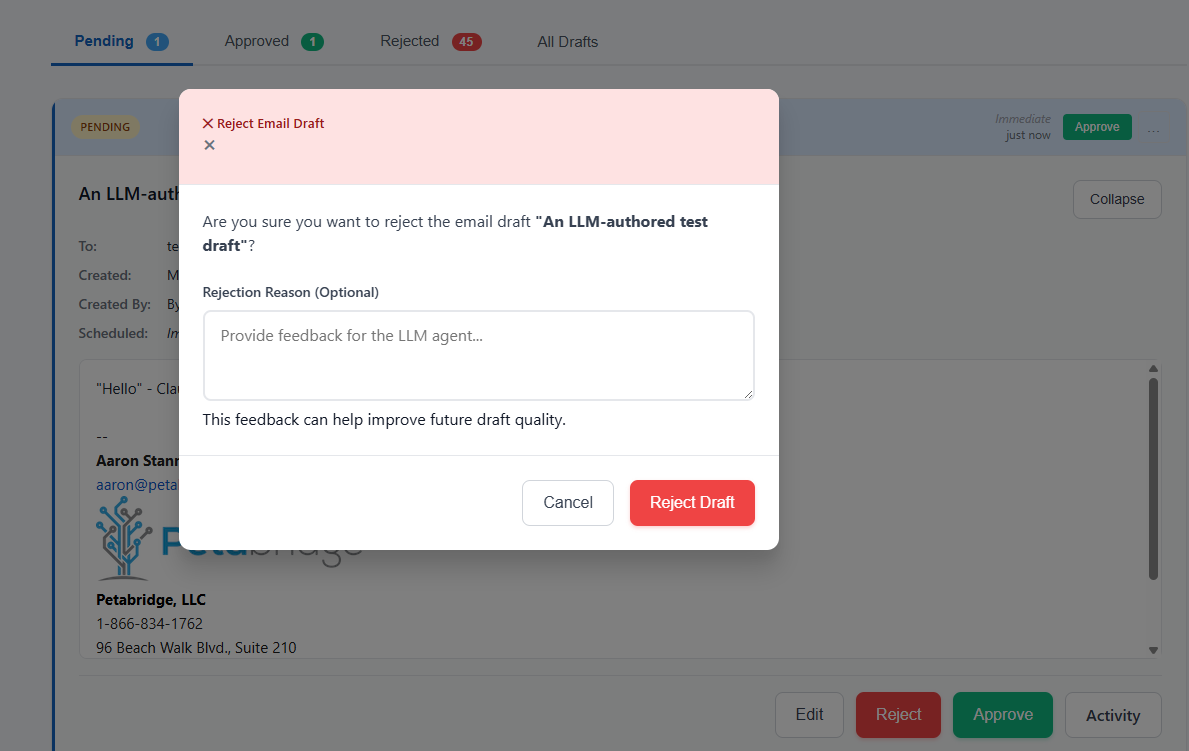
I’ll get into how this evolved from a self-hosted .NET application into a full-blown SaaS service in a subsequent essay - for now let’s talk about building a greenfield project with Software 2.0.
Planning and Designing the Project
My first git commit was cloning our Akka.NET build project template on GitHub; my second commit was authoring a CLAUDE.md file that accurately explained what I wanted to accomplish with this project and how I wanted to accomplish it.
The full file is ~400 lines, but here’s the high-level bit:
# LLM Email Gateway - Project Documentation

## Overview
Production-ready email gateway service for AI-powered email composition with human approval workflow. Built with ASP.NET Core 8, Akka.NET for fault-tolerant workflow orchestration, PostgreSQL persistence, and Gmail API integration.

This system enables LLM agents (like Claude, GPT-4, etc.) to draft emails on behalf of users, submit them for human approval, and send them via the user's own Gmail account.

## Architecture

#### High-Level Components

┌─────────────────────────────────────────────────┐
│              User (Web Browser)                 │
│         OR LLM Agent (with API token)           │
└────────────────┬────────────────────────────────┘
                 │ HTTPS (OAuth or Bearer token)
                 ▼
┌─────────────────────────────────────────────────┐
│         Nginx Reverse Proxy (SSL)               │
└────────────────┬────────────────────────────────┘
                 │
                 ▼
┌─────────────────────────────────────────────────┐
│    ASP.NET Core Email Gateway (Docker)          │
│                                                  │
│  ┌──────────────┐    ┌──────────────┐          │
│  │  Blazor UI   │    │  API         │          │
│  │  (Approval)  │    │  (Drafts,    │          │
│  │              │    │   Tokens)    │          │
│  └──────┬───────┘    └──────┬───────┘          │
│         │                   │                   │
│         └───────┬───────────┘                   │
│                 ▼                                │
│  ┌─────────────────────────────────────┐       │
│  │      Akka.NET Actor System          │       │
│  │                                      │       │
│  │  EmailGatewayGuardian               │       │
│  │    ├─ DraftManagerActor              │       │
│  │    │    └─ DraftActor (persistent)   │       │
│  │    ├─ ApprovalCoordinatorActor       │       │
│  │    ├─ NotificationActor              │       │
│  │    └─ EmailSendingSupervisor         │       │
│  │         └─ EmailSenderActor (persistent) │   │
│  └─────────────────────────────────────┘       │
└────────┬──────────────────┬─────────────────────┘
         │                  │
         ▼                  ▼
┌─────────────────┐  ┌──────────────────┐
│  PostgreSQL     │  │  Gmail API       │
│  - App Data     │  │  (Send as user)  │
│  - API Tokens   │  │                  │
│  - Akka Journal │  │                  │
│  - Snapshots    │  │                  │
└─────────────────┘  └──────────────────┘
         │
         ▼
┌─────────────────────────────┐
│  Slack Webhooks             │
│  (Approval notifications)   │
└─────────────────────────────┘
I didn’t write any of this myself either! Claude wrote CLAUDE.md in concert with me. Here’s what I did:
- A long speech-to-text3 session in Claude Code’s planning mode where I went back and forth with Claude over requirements, Gmail API capabilities, implementation details, and the sequencing of the build out.
- This is important: a reference architecture that was structurally similar to TextForge: DrawTogether.NET, an Akka.NET reference application I’ve maintained for years. It’s a tech stack I’m familiar with and its bones were also a good fit for the asynchronous / background processing design that my LLM Email Gateway would need.
Planning Mode
Most developers who “get bad results with AI” usually do so because they skip the most important part: planning mode.
In planning mode, the LLM gathers requirements from you and any other relevant context (i.e. existing source code, design documents, etc) to form a successful implementation plan. It depends a bit on which agent harness you’re using, but generally in planning mode the large language model can’t modify any files or emit any output other than its conversations with you. This is all designed to constrain it to focus on a real plan.
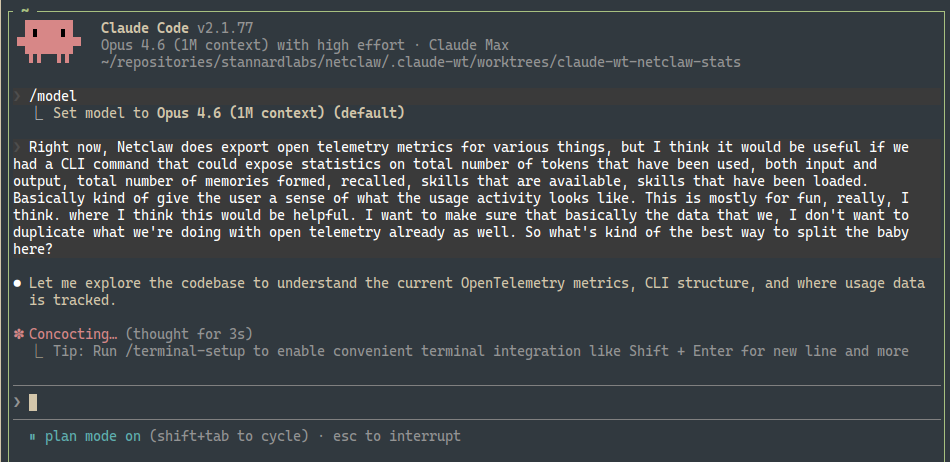
With TextForge, we created a small implementation plan for our blank project:
## Key Features

### Core Features (MVP)
- ✅ **Google OAuth Authentication** - Users sign in with Google accounts
- ✅ **User API Token Management** - Users create/revoke API tokens for LLM agents
- ✅ **Email Draft Management** - Create, edit, store email drafts
- ✅ **Approval Workflow** - Submit drafts, approve/reject with notes
- ✅ **Gmail API Integration** - Send emails as authenticated user
- ✅ **Rich Text Email Editor** - HTML email composition with preview
- ✅ **Slack Notifications** - Alert approvers when drafts need review
- ✅ **Pipedrive Context Display** - Show deal/contact info alongside drafts
- ✅ **Edit History/Audit Trail** - Track all changes and token usage
- ✅ **Actor-Based Workflow** - Fault-tolerant orchestration with Akka.NET
- ✅ **Persistent State** - Exactly-once delivery guarantee

## Implementation Phases
- Phase 1: Foundation -project setup, database, OAuth, tokens
- Phase 2: Actor System -persistent actors, supervision
- Phase 3: API Endpoints -drafts, tokens, auth middleware
- Phase 4: Email & Notifications -Gmail API, Slack
- Phase 5: Web UI -Blazor dashboard, approval pages
- Phase 6: Observability & Deploy -monitoring, security, Docker
I would not describe this plan as “RALPH-ready,” but that’s a technique we’ll dig into later. For the time being, this plan was good enough for me and Claude to work together on building our minimum viable product - because:
- It outlines the requirements and rough overall vision for the product;
- Outlines the technology stack and integration points with external services; and
- Provides a sensible and orderly approach to implementation.
Claude always massively overestimates how long things take, as this project was mostly finished initially within about 10 days, but aside from that this is a good starting place.
Reference Architectures and Samples
Another ingredient that is extremely useful when doing greenfield development with large language models is providing a reference sample the LLM can lean on for bootstrapping. Large language models rely heavily on pre-existing context inside the repository for coding and this presents different challenges for brownfield and greenfield projects:
- Brownfield: if you have existing patterns that are inherently bad, like the ones we’re trying to replace inside Sdkbin, LLMs are going to replicate those unless you stop them. This requires a lot of human-guided interactivity and corrections initially, until there’s a large enough corpus of “healthy” code to outweigh the “unhealthy” code you’re trying to deprecate and replace.
- Greenfield: the LLM has no context other than what you tell it in your prompts, so it’s going to rely heavily on its training weights for implementation strategy and direction. If you truly don’t care what the code looks like then this might not be a problem… Generally though, if you’re a software engineer and you want to build things to last, you need to care because otherwise Claude, Codex, or whatever model you select is going to build something alien that you won’t have the experience or competence to debug when problems occur.
So there are three happy mediums you can use for greenfield development:
- Templates - we use a .NET build system template as a starting point because this gets our .NET solution management, GitHub Actions pipeline, and numerous other pieces into a healthy starting position before any code is written.
- Reference Architecture or Sample - a reference sample where the domain is different but the architecture is still desirable. This helps the LLM decide what tools to use, how to deploy them, patterns it should re-use (i.e. vertical slice, CQRS, streaming, etc), and other benefits like code style.
- Skill files - agent skills are typically human-authored context sources that can be dynamically retrieved by agent harnesses such as Claude Code, OpenCode, etc on-demand. Skills help outline procedures, best practices, and diagnostic patterns (i.e. how to fetch OpenTelemetry data from application-specific sources) that help standardize agent behavior over time.
In the case of TextForge, I had Claude reference our popular, production-grade DrawTogether.NET sample that demonstrates how to integrate Akka.NET, Aspire, Blazor Server, and some other .NET bits to make an interactive web application with lots of background processing.
DrawTogether’s requirements don’t exactly match TextForge, as DrawTogether is a duplex real-time client UI application and TextForge is a heavy-data processing model context protocol application, but that’s actually not that important in the context of how Claude or any other large language model uses it. We used DrawTogether to show Claude how to build TextForge, not what to build.
Agent Skills
There was a lot of senseless hype about model context protocol (MCP) when it first launched. Agent skills, which shipped a bit later in 2025, are still stuck in a bit of a hype cycle.
Speaking plainly: agent skills are markdown files that provide agents with
- Some “front matter” context that answers questions like “when should this skill be used?” and “what does this skill do?”
- Detailed instructions on how to do the above.
Here’s a fragment of a skill4 I wrote that explains how to use Aspire and Mailpit for local SMTP testing on transactional emails in ASP.NET Core:
---
name: mailpit-integration
description: Test email sending locally using Mailpit with .NET Aspire. Captures all outgoing emails without sending them. View rendered HTML, inspect headers, and verify delivery in integration tests.
invocable: false
---

# Email Testing with Mailpit and .NET Aspire

## When to Use This Skill

Use this skill when:
- Testing email delivery locally without sending real emails
- Setting up email infrastructure in .NET Aspire
- Writing integration tests that verify emails are sent
- Debugging email rendering and headers

**Related skills:**
- `aspnetcore/mjml-email-templates` - MJML template authoring
- `testing/verify-email-snapshots` - Snapshot test rendered HTML
- `aspire/integration-testing` - General Aspire testing patterns

---

## What is Mailpit?

[Mailpit](https://github.com/axllent/mailpit) is a lightweight email testing tool that:
- Captures all SMTP traffic without delivering emails
- Provides a web UI to view captured emails
- Exposes an API for programmatic access
- Supports HTML rendering, headers, and attachments

Perfect for development and integration testing.
Skills are useful both during planning and also during initial development. The benefit of having this specific skill is that it takes something non-obvious and important, how to integration test transactional emails locally during development, and saves the agent the trouble of having to reinvent the wheel.
Probably the most helpful thing you can do with skills is create them as you go. When I have to solve a non-trivial problem more than once, I codify my solution into a local skill saved to that repository. If I have the same problem occur across more than one repository, I save it to a shared “skills” repository that I can install on each machine.
Requirements and Refinements
At this stage in building out TextForge, we had a rough implementation plan plus some reference materials and skills. That got us to a production-ish “Hello World” stage, but we had to start introducing the next tier of planning: product requirements documents, otherwise known as “PRDs.”
The first one I defined was for scoping bearer tokens for LLM authentication: if I’m delegating access to my inbox to a large language model then I want fine-grained control over what functionality that agent can invoke through my LLM Email Gateway.
So I drafted a PRD for this with Claude Code:
# Token Permissions Design

## Overview

API tokens need fine-grained permissions to prevent AI agents from approving their own drafts. This implements the principle of least privilege.

## Permission Scopes

### Draft Permissions
- **`drafts:create`** - Create new email drafts
- **`drafts:read`** - Read draft details
- **`drafts:update`** - Update existing drafts (only in Draft status)
- **`drafts:submit`** - Submit drafts for approval
- **`drafts:approve`** - Approve pending drafts ⚠️ Should NOT be granted to AI tokens
- **`drafts:reject`** - Reject pending drafts ⚠️ Should NOT be granted to AI tokens

(rest of PRD)
We still use this same design today in TextForge: you can create scoped tokens to control what levels of access agents have to your email account. We did end up evolving it some more later, i.e. most TextForge users now use MCP OAuth instead of explicit bearer tokens, but that’s all built on top of our API token system.
Again, the idea behind Software 2.0 is simple: you plan before you code, which is how it really should have been done in the first place, but now that you are delegating much of the implementation work to an agent this is a necessity.
With this PRD and the other bones in-place, Claude implemented all of it in about 30 minutes or so - including integration testing to validate that the tokens were enforced at the boundaries of our application.
Implementation
TextForge’s implementation was largely live pairing sessions between Claude and me.
I’d “drive” with my speech-to-text prompts, Claude implements, I review code and test the app, report bugs back to Claude, and repeat:
flowchart TD
    A[Speak prompts] --> B[Claude implements]
    B --> C[Review & test]
    C --> D{Bugs?}
    D -->|Yes| A
    D -->|No| E[Next feature]
I wanted to spend as little time as possible manually reviewing things myself, so I built a verification pipeline that allowed me to have Claude Check itself while I was attending to other things.
Initial Verification Pipeline
Our initial verification pipeline consisted of:
- C# compiler and additional static analysis rules via Roslyn Analyzers, the best line of defense. I also made sure that
TreatWarningsAsErrorswas enabled because this prevents all sorts of rot from setting into the code base (i.e. NuGet package vulnerability warnings and deprecations have to be addressed immediately); .editorconfigand linter rules viadotnet format;- Automated tests, largely specified by me in our prompts; and
- Aspire integration tests to validate end-to-end behavior.
This pipeline is nothing special and pretty basic, but for reasons I still don’t understand - way more advanced than what you see in 99% of human-authored .NET applications even in 2026.
We were able to get pretty far with this verification pipeline but eventually it broke down in a few key areas:
- The
.editorconfigchecks were largely worthless and burned millions of tokens over 1-2 months on trivial issues like whether or not there was an extra line ending in each.csfile. I removed that check entirely. - Having the LLM author tests is a bit of a double-edged sword: Claude was able to find many of its own bugs, but it also authored lots of anemic tests that checked the “has test coverage” box without really testing the functionality thoroughly.
So we made some improvements:
- Enabled the Aspire MCP server so Claude could “click test” the full application itself using Playwright browser automation and get full OpenTelemetry traces;
- Added a
/dev-loginendpoint that allowed Claude to bypass our “Login with Google” functionality, because all of our accounts are secured with 2FA; - Added some more Claude Code skills and system prompts to encourage Claude to do this click testing after making substantive changes; this isn’t the same as adding Playwright end-to-end tests to the test suite itself; and
- Had Claude supervise (via Aspire MCP) while we did work with our test Google accounts so it could inspect the real Google OAuth integration and help debug issues we had with missing refresh tokens, changing OAuth scopes (need to invalidate older tokens,) and more.
This was surprisingly effective, even though it wasn’t fully automated. Testing third party API integrations in a safe, repeatable way is always challenging, but this worked sufficiently for our purposes.
Snapshot Tests
Once we achieved a fully working end-to-end prototype, complete with email signature and MIME support for inline attachments, we needed to make sure LLMs couldn’t accidentally break this composite, high-level functionality without escaping our notice.
An extremely inexpensive technique for doing this is snapshot testing, and in .NET there’s no better library for doing this than Verify.
We authored tests to snapshot end-to-end draft output with a stamp of “human approval” - any pull requests that accidentally modified the test output fail if the corresponding approval file isn’t also updated. And since the approval files are also source-controlled, it’s very easy to detect if an LLM modified those:
<p>Hello,</p><p>Quick message.</p><p><br></p><p><strong>John Doe</strong></p>
<p><em>Senior Engineer</em></p>
<p>Email: <a href="mailto:[email protected]">[email protected]</a></p>
<p>Phone: (555) 123-4567</p>
<p><br></p>
<p><small>Company, Inc. | www.example.com</small></p>
These tests caught scores of unauthorized changes, and usually Claude responded by fixing its own regressions rather than changing the test approval files.
Incremental Refactoring and Cleanup
Large language models are much better at writing code than they are at maintaining it, and left unchecked they’ll slopify your code base. Thus it was important for me to periodically work on some purely technical cleanup sprints with Claude.
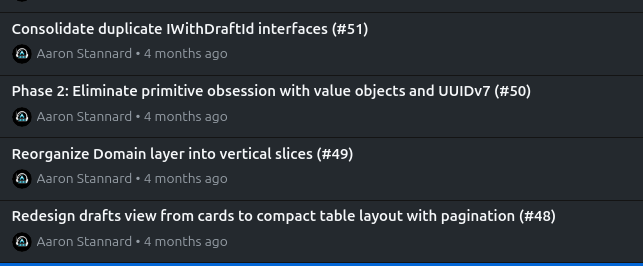
We:
- Forced Claude to use enums and value objects instead of stringly-typed primitives or magic numbers; this is generally a good technique to help the type system catch mistakes early;
- Cleaned up duplicate code and removed anemic tests; and most impactfully
- Refactored the solution from “junk drawer” code organization, i.e.
TextForge.Models.Enums, to using vertical slices where code is organized by feature instead, i.e.TextForge.Drafts.Approvals,TextForge.EmailProviders.Google.
The vertical slice organization piece was something I wanted for my own purely selfish reasons: it helps me read and review code much more easily because it puts all of the adjacent parts for a given feature together in close proximity in the file system and in my IDE. However, it had a rather surprising ancillary benefit as well: it made it much easier for Claude to explore relevant code when working in a given feature area.
What’s Next: Scaling Beyond Attended Development
These techniques -planning mode, reference architectures, agent skills, verification pipelines, snapshot testing, and incremental refactoring -got TextForge from a blank repository to a working, tested product. But they all share one thing in common: they require a human in the loop at every step.
Scaling from a working prototype to a full SaaS product meant finding ways to delegate larger, multi-step changes to agents with less direct supervision -using tools like OpenProse and RALPH loops to break big changes into plannable, verifiable chunks that could execute without me watching every step.
That required a much more robust verification pipeline, more detailed implementation plans, and many more product requirements documents. We’ll cover all of that in the next essay on Software 2.0.
-
“Pipedrive Gmail add-on” - used it for years, generally pretty helpful but it has a hard time correlating customers across different deals, which is a problem for us when we’re handling annual subscription renewals. ↩
-
This is an unfortunate design error that a lot of OpenClaw users have discovered the hard way: “OpenClaw gone rogue: five times an AI agent wrecked someone’s email” ↩
-
The number one productivity improvement you can make when working with LLMs is to get great dictation software working on your computer. I wrote one, witticism, which I still use on my Linux machines. I use Handy on my Windows machine. Your mileage may vary. ↩
-
The Aspire + Mailpit skill and about 20 others are available in https://github.com/Aaronontheweb/dotnet-skills; you may find these useful if you’re a .NET developer. ↩
Discussion, links, and tweets

I'm the CTO and founder of Petabridge, where I'm making distributed programming for .NET developers easy by working on Akka.NET, Phobos, and more..
Tweet Follow @Aaronontheweb