
Clipboard And Feedback
Termina's clipboard support is terminal-native first. It is designed to work in local terminals, remote SSH sessions, and tmux-based workflows without dropping into platform-specific clipboard commands.
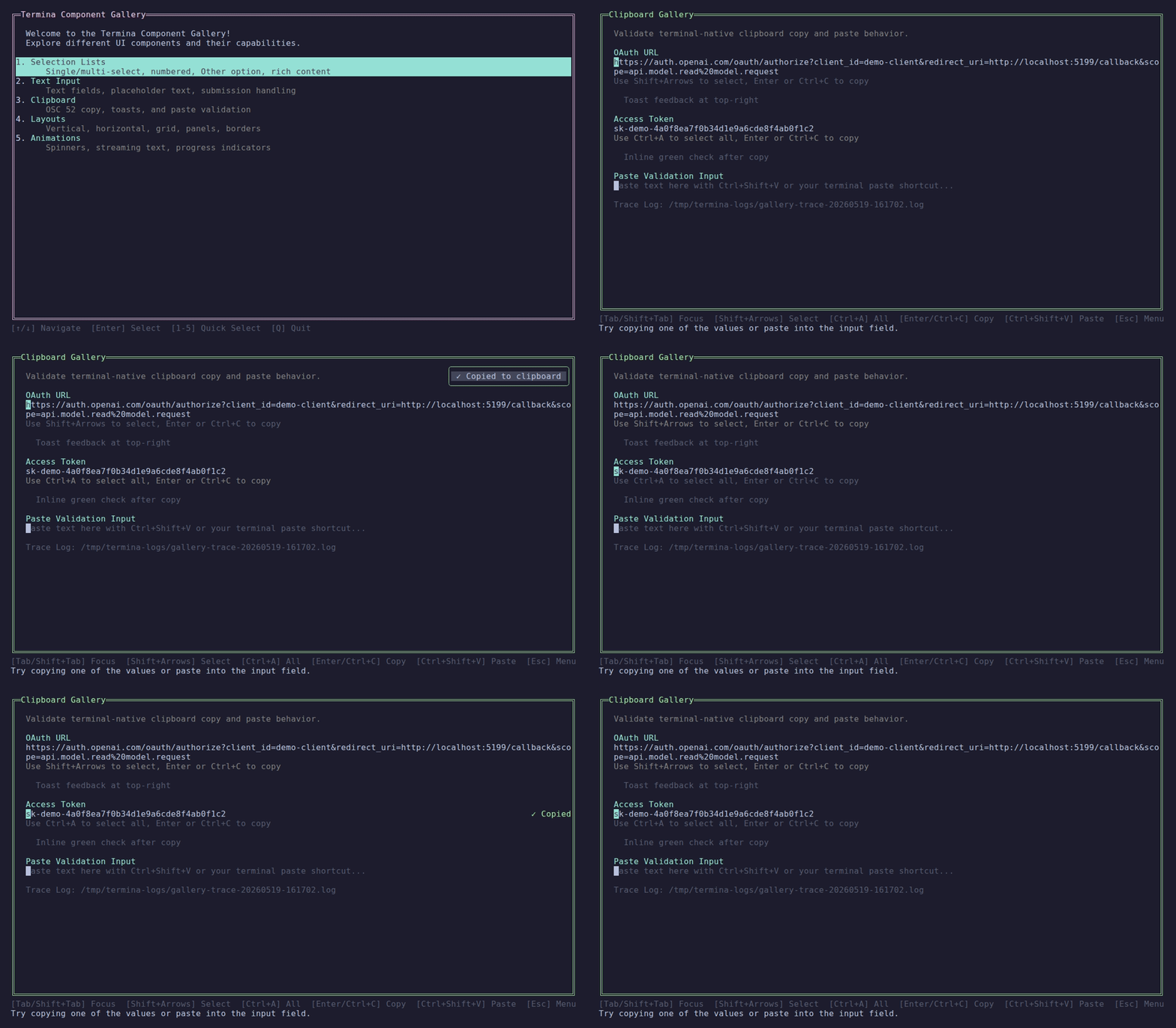
Copying text with toast and inline-indicator feedback.
Clipboard Architecture
Clipboard requests flow through IClipboardService, which fans out to one or more transports.
Osc52ClipboardTransportsends OSC 52 clipboard sequences through the active terminalTmuxClipboardTransportintegrates with tmux when theTMUXenvironment variable is present
This keeps the application-facing API simple:
var copied = clipboardService.Copy(url);The service returns true when at least one transport reports success.
Why Multiple Transports?
Terminal clipboard behavior varies across terminal emulators and multiplexers.
- OSC 52 is the clean terminal-native path
- tmux often needs explicit clipboard handoff even when OSC 52 is emitted correctly
Using transports lets Termina keep those concerns out of pages and components.
Toast Notifications
IToastService exposes a single active toast as an observable. TerminaApplication hosts the overlay globally, so pages do not need to render their own popup shell.
toastService.Show(
    "Copied to clipboard",
    new ToastOptions(
        Duration: TimeSpan.FromSeconds(2),
Position: ToastPosition.TopRight));This keeps feedback decoupled from the component that triggered it.
Custom Colors and Icons
Toast border color and icon are configurable via ToastOptions. When omitted, the defaults are a green border (Color.BrightGreen) and a checkmark icon (✓).
// Success toast with green border and checkmark
toastService.Show("Saved", new ToastOptions(Color: Color.BrightGreen, Icon: "✓"));

// Error toast with red border and cross
toastService.Show("Failed to save", new ToastOptions(Color: Color.BrightRed, Icon: "✗"));

// Warning toast with yellow border
toastService.Show("Check your input", new ToastOptions(
    Color: Color.BrightYellow,
    Icon: "⚠",
Position: ToastPosition.TopCenter));Both Color and Icon are optional. You can set one without the other — for example, change the border color while keeping the default checkmark icon, or supply a custom icon while keeping the default green border.
Inline Feedback
If you do not want a global toast, components like CopyableTextNode can show local feedback instead.
Examples:
- a green check mark beside the copied value
- a short
Copiedlabel near the field - both inline feedback and a toast
Diagnostics
When file tracing is enabled, clipboard operations produce trace output through TerminaTrace.
Useful trace points include:
- focused copyable node input handling
- clipboard transport selection and success
- toast emission and rendering
The gallery demo enables file tracing and surfaces the trace log path on the Clipboard page for easier troubleshooting.