
Grid Layout
GridNode provides true 2D layout with consistent column widths and row heights across all cells. Unlike nesting HorizontalLayout inside VerticalLayout (where each row calculates widths independently), GridNode ensures uniform cell sizing across the entire grid.
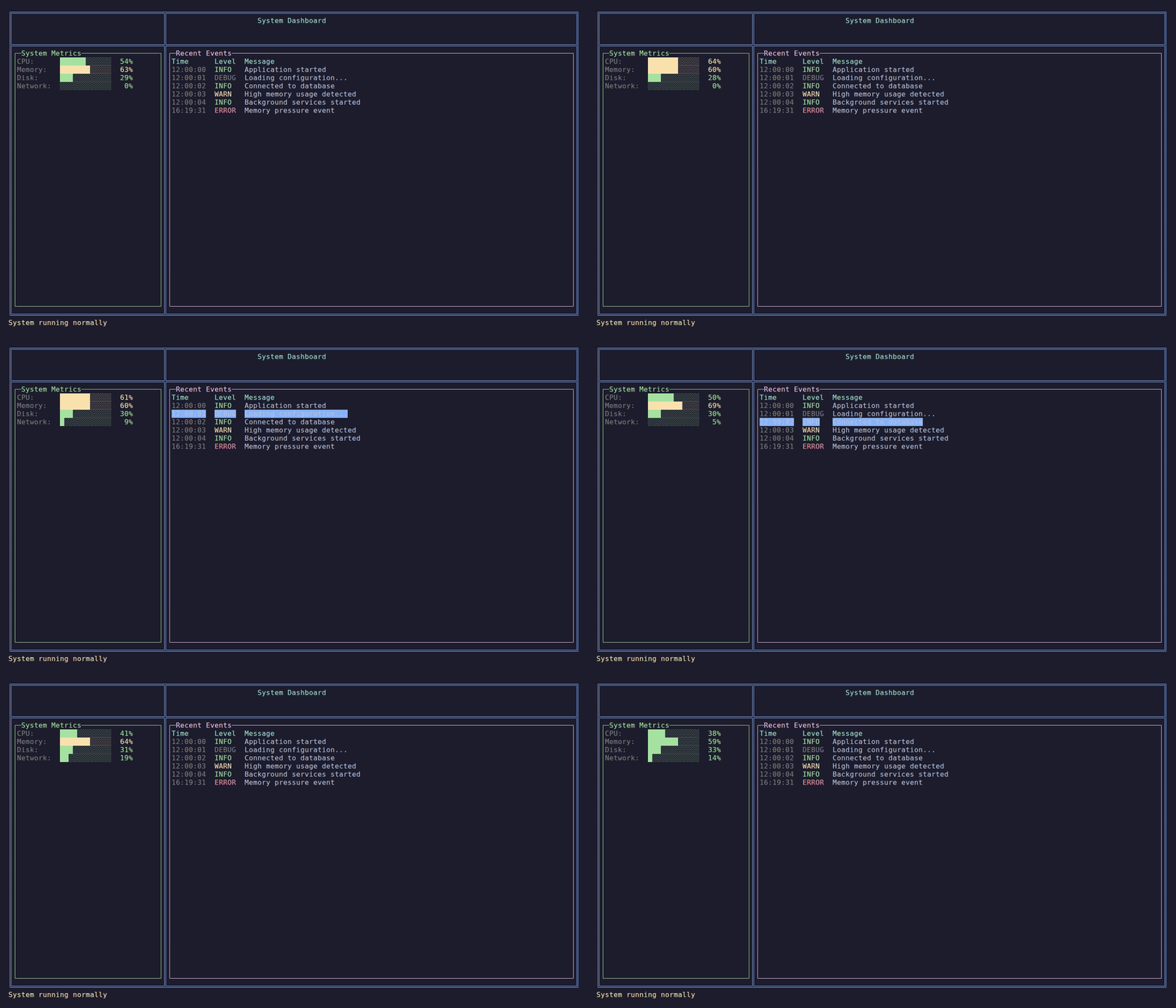
A dashboard built with GridNode — nested grids and a log table.
When to Use GridNode
| Use Case | Why GridNode |
|---|---|
| Data tables | Consistent column alignment across rows |
| Dashboards | Multi-panel layouts with precise sizing |
| Forms | Aligned labels and inputs |
| Metrics displays | Uniform cell sizes for visual consistency |
Basic Usage
Create a grid with explicit dimensions or build it dynamically:
// Explicit dimensions
var grid = new GridNode(rows: 3, cols: 2);

// Or build dynamically with AddRow
var grid = new GridNode()
    .WithColumns(SizeConstraint.Exactly(15), SizeConstraint.FillRemaining())
    .AddRow(new TextNode("Name:"), new TextNode("John Doe"))
    .AddRow(new TextNode("Email:"), new TextNode("[email protected]"))
.AddRow(new TextNode("Role:"), new TextNode("Developer"));Column and Row Constraints
Define column widths and row heights using the same constraint types as other layouts:
var grid = new GridNode()
    .WithColumns(
        SizeConstraint.Exactly(10),      // Fixed 10 columns
        SizeConstraint.FillRemaining(),  // Take remaining space
        SizeConstraint.Exactly(8))       // Fixed 8 columns
    .WithRows(
        SizeConstraint.Exactly(1),       // Header row: 1 line
SizeConstraint.FillRemaining()); // Content: remaining spaceAvailable constraints:
| Constraint | Description |
|---|---|
Exactly(n) | Fixed size in columns/rows |
FillRemaining() | Take remaining space after fixed/auto |
Auto() | Size to content |
Percentage(n) | Percentage of available space |
Setting Cell Content
Use SetCell() for explicit positioning or AddRow() for sequential building:
// Explicit positioning (row, col, content)
grid.SetCell(0, 0, new TextNode("Header").Bold());
grid.SetCell(1, 0, new TextNode("Cell 1,0"));
grid.SetCell(1, 1, new TextNode("Cell 1,1"));

// Sequential row building
grid.AddRow(
    new TextNode("Label"),
new TextNode("Value"));Cell Spanning
Cells can span multiple columns and/or rows:
// Header spanning 3 columns
grid.SetCell(0, 0,
    new TextNode("Dashboard Title").AlignCenter().Bold(),
    colSpan: 3);

// Tall cell spanning 2 rows
grid.SetCell(1, 0,
    new TextNode("Sidebar\nContent"),
rowSpan: 2);Grid Lines
Add borders between cells using WithGridLines():
var grid = new GridNode()
    .WithColumns(SizeConstraint.Exactly(10), SizeConstraint.FillRemaining())
    .AddRow(new TextNode("Name"), new TextNode("Value"))
    .AddRow(new TextNode("CPU"), new TextNode("45%"))
    .WithGridLines(BorderStyle.Single)
.WithGridLineColor(Color.Blue);Available border styles:
BorderStyle.None- No grid lines (default)BorderStyle.Single- Single line (─│┌┐└┘├┤┬┴┼)BorderStyle.Double- Double line (═║╔╗╚╝╠╣╦╩╬)BorderStyle.Rounded- Rounded corners (─│╭╮╰╯├┤┬┴┼)BorderStyle.Ascii- ASCII characters (-|+)
Nested Grids
Grids can contain other grids for complex layouts:
// Metrics panel with its own grid
var metricsGrid = new GridNode()
    .WithColumns(SizeConstraint.Exactly(10), SizeConstraint.FillRemaining())
    .AddRow(new TextNode("CPU:"), new TextNode("45%"))
    .AddRow(new TextNode("Memory:"), new TextNode("62%"));

// Main dashboard grid
var dashboard = new GridNode()
    .WithColumns(SizeConstraint.Exactly(30), SizeConstraint.FillRemaining())
    .WithRows(SizeConstraint.Exactly(1), SizeConstraint.FillRemaining())
    .WithGridLines(BorderStyle.Double);

dashboard.SetCell(0, 0, new TextNode("System Dashboard").AlignCenter(), colSpan: 2);
dashboard.SetCell(1, 0, new PanelNode().WithTitle("Metrics").WithContent(metricsGrid));
dashboard.SetCell(1, 1, new PanelNode().WithTitle("Logs").WithContent(logsContent));Focus Navigation
Enable keyboard navigation for interactive grids:
var grid = new GridNode()
    .WithNavigationMode(GridNavigationMode.CellNavigation)
.WithFocusHighlight(Color.Blue, Color.White);Navigation modes:
| Mode | Behavior |
|---|---|
None | Display only, no keyboard navigation |
CellNavigation | Arrow keys move between cells, Enter activates |
ChildFocusRouting | Tab routes to focusable children in cells |
Observables
// React to focus changes
grid.FocusedCellChanged.Subscribe(pos =>
    Console.WriteLine($"Focused: row {pos.Row}, col {pos.Col}"));

// React to cell activation (Enter key)
grid.CellActivated.Subscribe(info =>
HandleCellActivated(info.Row, info.Col, info.Cell));Complete Example: Dashboard
public class DashboardPage : ReactivePage<DashboardViewModel>
{
    public override ILayoutNode BuildLayout()
    {
        return BuildDashboard().Fill();
    }

    private GridNode BuildDashboard()
    {
        var dashboard = new GridNode()
            .WithColumns(
                SizeConstraint.Exactly(35),
                SizeConstraint.FillRemaining())
            .WithRows(
                SizeConstraint.Exactly(3),
                SizeConstraint.FillRemaining())
            .WithGridLines(BorderStyle.Double)
            .WithGridLineColor(Color.Blue);

        // Header spanning both columns
        dashboard.SetCell(0, 0,
            new TextNode("System Dashboard")
                .AlignCenter()
                .Bold()
                .WithForeground(Color.Cyan),
            colSpan: 2);

        // Left column: Metrics
        dashboard.SetCell(1, 0, BuildMetricsPanel());

        // Right column: Event log
        dashboard.SetCell(1, 1, BuildLogsPanel());

        return dashboard;
    }

    private ILayoutNode BuildMetricsPanel()
    {
        var grid = new GridNode()
            .WithColumns(
                SizeConstraint.Exactly(10),
                SizeConstraint.FillRemaining());

        grid.AddRow(
            new TextNode("CPU:"),
            ViewModel.CpuUsageChanged
                .Select(cpu => BuildProgressBar(cpu))
                .AsLayout());

        grid.AddRow(
            new TextNode("Memory:"),
            ViewModel.MemoryUsageChanged
                .Select(mem => BuildProgressBar(mem))
                .AsLayout());

        return new PanelNode()
            .WithTitle("Metrics")
            .WithContent(grid);
    }

    private static TextNode BuildProgressBar(int percentage)
    {
        var filled = (int)(percentage / 100.0 * 12);
        var bar = new string('█', filled) + new string('░', 12 - filled);
        return new TextNode($"{bar} {percentage,3}%")
            .WithForeground(percentage >= 80 ? Color.Red : Color.Green);
    }
}GridNode vs. Nested Layouts
| Feature | GridNode | Nested Horizontal/Vertical |
|---|---|---|
| Column width consistency | All rows share same widths | Each row independent |
| Grid lines | Built-in border rendering | Manual with PanelNode |
| Cell spanning | Native colspan/rowspan | Complex workarounds |
| 2D navigation | Built-in arrow key nav | Not available |
| Best for | Tables, dashboards, forms | Simple stacking |
API Reference
Properties
| Property | Type | Description |
|---|---|---|
RowCount | int | Number of rows |
ColumnCount | int | Number of columns |
GridLines | BorderStyle | Border style for grid lines |
GridLineColor | Color? | Color for grid lines |
CellPadding | int | Padding inside cells |
NavigationMode | GridNavigationMode | Keyboard navigation mode |
FocusedRow | int | Currently focused row |
FocusedColumn | int | Currently focused column |
Methods
| Method | Description |
|---|---|
WithColumns(...) | Set column constraints |
WithRows(...) | Set row constraints |
SetCell(row, col, content, colSpan?, rowSpan?) | Set cell content |
AddRow(...) | Add a row with cells |
WithGridLines(style) | Set grid line style |
WithGridLineColor(color) | Set grid line color |
WithCellPadding(padding) | Set cell padding |
WithNavigationMode(mode) | Set navigation mode |
WithFocusHighlight(bg, fg) | Set focus highlight colors |
Observables
| Observable | Type | Description |
|---|---|---|
Invalidated | IObservable<Unit> | Grid needs re-render |
FocusedCellChanged | IObservable<(int Row, int Col)> | Focus moved |
CellActivated | IObservable<(int Row, int Col, ILayoutNode? Cell)> | Cell activated |