
StreamingTextNode
Displays streaming text content with automatic scrolling and word wrapping. Ideal for chat interfaces, logs, and LLM output.
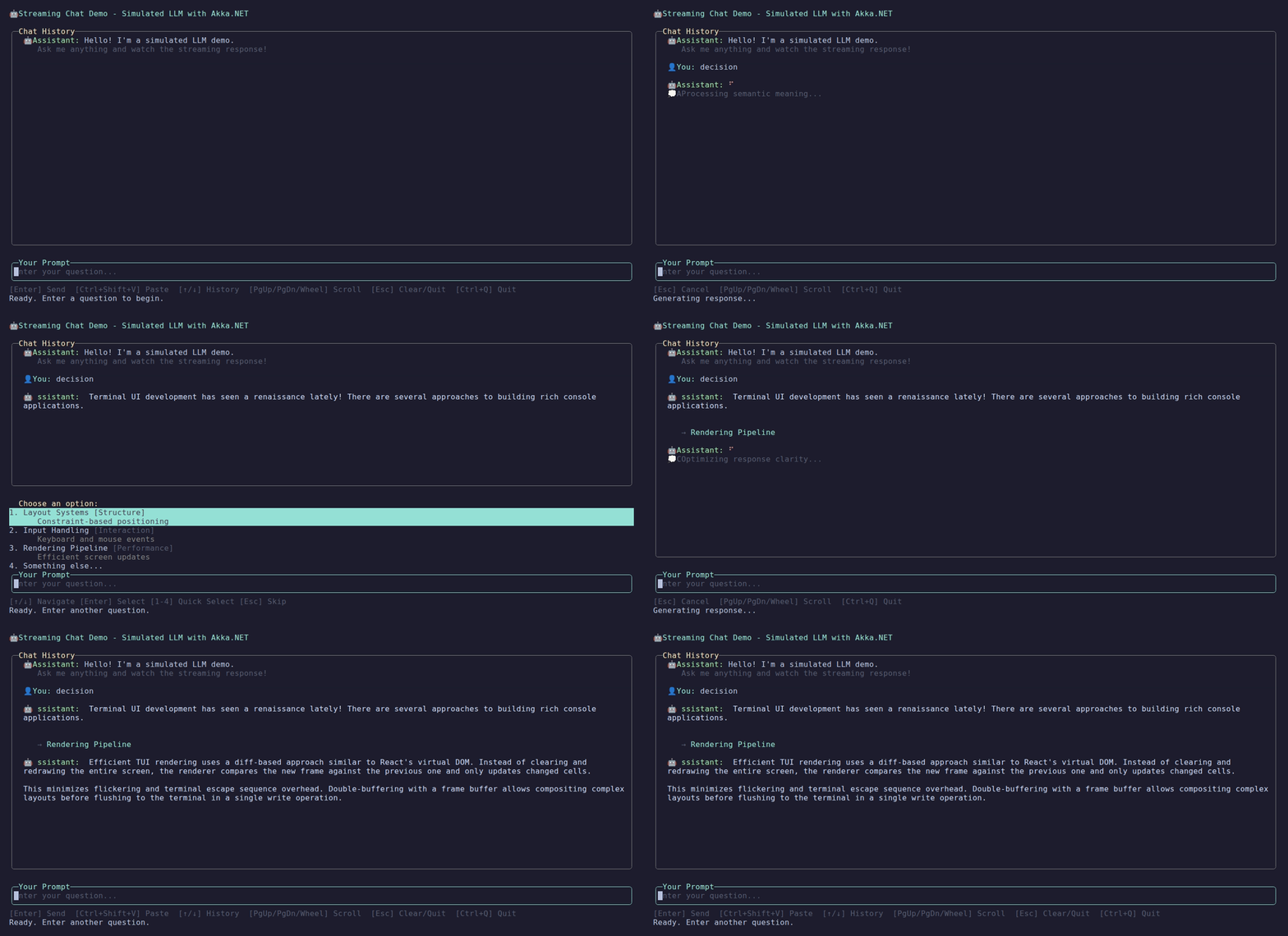
StreamingTextNode rendering a chat response as it streams.
Basic Usage
// Create with persisted buffer (retains all content)
var stream = StreamingTextNode.Create();

// Append content
stream.AppendLine("User: Hello!");
stream.AppendLine("Bot: Hi there!");

// Append streaming content (character by character)
stream.Append("Thinking");
stream.Append(".");
stream.Append(".");
stream.Append(".");Buffer Types
Persisted Buffer (Default)
Retains all content with scrolling support:
var stream = StreamingTextNode.Create();

// Supports scrolling
stream.ScrollUp(5);
stream.ScrollDown(5);
stream.ScrollToBottom();Windowed Buffer
Rolling buffer that retains only recent lines:
// Keep last 100 lines
var stream = StreamingTextNode.CreateWindowed(windowSize: 100);Line Prefixes
Add prefixes to each line (useful for chat):
var userStream = StreamingTextNode.Create()
    .WithPrefix("You: ", Color.Cyan);

var botStream = StreamingTextNode.Create()
.WithPrefix("Bot: ", Color.Green);Styling
Node-Level Styling
Set default colors for the entire node:
StreamingTextNode.Create()
    .WithForeground(Color.White)
    .WithBackground(Color.Black)
.WithPrefix("> ", Color.Gray)Inline Styled Text
Append text with inline colors and text decorations:
var stream = StreamingTextNode.Create();

// Colored text
stream.Append("Error: ", foreground: Color.Red);
stream.AppendLine("Something went wrong", foreground: Color.Yellow);

// With background
stream.Append("Highlighted", foreground: Color.Black, background: Color.Yellow);

// With decorations
stream.Append("Bold text", decoration: TextDecoration.Bold);
stream.Append("Italic text", decoration: TextDecoration.Italic);

// Combined decorations
stream.Append("Bold and underlined",
    foreground: Color.Cyan,
decoration: TextDecoration.Bold | TextDecoration.Underline);Text Decorations
The following decorations are available:
| Decoration | Description |
|---|---|
TextDecoration.None | No decoration (default) |
TextDecoration.Bold | Bold/bright text |
TextDecoration.Dim | Dimmed text |
TextDecoration.Italic | Italic text |
TextDecoration.Underline | Underlined text |
TextDecoration.Strikethrough | Strikethrough text |
Decorations can be combined using bitwise OR:
var style = TextDecoration.Bold | TextDecoration.Italic | TextDecoration.Underline;
stream.Append("All styles", decoration: style);Using StyledSegment
For more control, use StyledSegment directly:
var style = new TextStyle(
    foreground: Color.Green,
    background: Color.Default,
    decoration: TextDecoration.Bold
);

stream.Append(new StyledSegment("Success!", style));Style Precedence
Inline styles override node-level defaults:
var stream = StreamingTextNode.Create()
    .WithForeground(Color.White);  // Default white

stream.AppendLine("This is white");  // Uses default
stream.AppendLine("This is red", foreground: Color.Red);  // Override
stream.AppendLine("Back to white"); // Uses default againReal-World Chat Example
Building a rich chat interface with styled messages:
var chat = StreamingTextNode.Create();

// Tool invocation
chat.Append("○ ", foreground: Color.Yellow);
chat.Append("search_web", foreground: Color.Cyan);
chat.AppendLine("(\"latest news\")", foreground: Color.BrightBlack);

// Error message
chat.Append("Error: ", foreground: Color.Red, decoration: TextDecoration.Bold);
chat.AppendLine("Network timeout", foreground: Color.Red);

// Success message
chat.Append("✓ ", foreground: Color.Green);
chat.AppendLine("Task completed", foreground: Color.Green);

// Streaming LLM response with mixed styles
chat.Append("Assistant: ", foreground: Color.Blue, decoration: TextDecoration.Bold);
await foreach (var token in llmResponse)
{
    chat.Append(token);  // Plain text for LLM output
}
chat.AppendLine("");Why Structured API Instead of Markup?
Termina uses a structured API (not markup like [red]text[/red]) because:
- Safe for LLM output - No need to escape user content or AI responses
- Type-safe - IDE autocompletion and compile-time checking
- Composable - Build styled segments programmatically
Style Preservation in Word Wrap
Styles are automatically preserved when text wraps to multiple lines:
// Long styled text that wraps
stream.Append(
    "This is a long red message that will automatically wrap to multiple lines while preserving the red color across all wrapped lines.",
    foreground: Color.Red
);Background highlights stay contiguous across a wrap. The space that joins two words on a wrapped line takes the style of the whitespace that separated them in the source. A highlighted phrase keeps its background across the whole phrase, and an unstyled gap between two highlighted words does not pick up a background.
// The yellow highlight covers the whole phrase, including the spaces between words.
stream.Append(
    "Highlighted message that wraps",
    foreground: Color.Black,
    background: Color.Yellow
);Text Composition and Tracked Segments
StreamingTextNode supports tracked segments - text elements that can be independently animated and later removed or replaced. This enables inline animations like spinners, progress bars, timers, and other dynamic content that appears alongside static text.
Concepts
Untracked vs Tracked Content:
- Untracked (default): Regular
Append()andAppendLine()calls create immutable content with zero overhead - Tracked:
AppendTracked()creates mutable segments that can be animated, removed, or replaced
Segment Types:
| Type | Interface | Purpose |
|---|---|---|
StaticTextSegment | ITextSegment | Static trackable text that can be removed/replaced |
SpinnerSegment | IAnimatedTextSegment | Animated spinner with multiple styles |
| Custom implementations | ITextSegment or IAnimatedTextSegment | Your own tracked segments |
Caller-Provided IDs
Like HTML elements with id attributes, tracked segments use caller-provided IDs. You choose the ID upfront:
// Define your segment IDs
private static readonly SegmentId SpinnerId = new(1);
private static readonly SegmentId TimerId = new(2);
private static readonly SegmentId ProgressId = new(3);

// Use them for tracking
stream.AppendTracked(SpinnerId, new SpinnerSegment());This eliminates the need to capture and track returned IDs - you control the identifiers.
Static Tracked Segments
Use StaticTextSegment when you need to track non-animated text for later removal or replacement:
var stream = StreamingTextNode.Create();

// Append tracked static text
var placeholder = new StaticTextSegment("[loading...]", Color.Gray);
stream.AppendTracked(new SegmentId(1), placeholder);

// Later, replace with actual content
stream.Replace(
    new SegmentId(1),
    new StaticTextSegment("Operation complete!"),
    keepTracked: false  // Convert to untracked
);Animated Segments
SpinnerSegment provides inline animated spinners with 6 styles:
using Termina.Components.Streaming;

var stream = StreamingTextNode.Create();

// Append "Thinking: " followed by animated spinner
stream.Append("Thinking: ");
var spinner = new SpinnerSegment(
    SpinnerStyle.Dots,  // ⠋ ⠙ ⠹ ⠸ ⠼ ⠴ ⠦ ⠧ ⠇ ⠏
    Color.Yellow,
    intervalMs: 80
);
stream.AppendTracked(new SegmentId(1), spinner);Available Spinner Styles:
| Style | Animation Frames |
|---|---|
SpinnerStyle.Dots | ⠋ ⠙ ⠹ ⠸ ⠼ ⠴ ⠦ ⠧ ⠇ ⠏ |
SpinnerStyle.Line | - \ | / |
SpinnerStyle.Arrow | ← ↖ ↑ ↗ → ↘ ↓ ↙ |
SpinnerStyle.Bounce | ⠁ ⠂ ⠄ ⠂ |
SpinnerStyle.Box | ▖ ▘ ▝ ▗ |
SpinnerStyle.Circle | ◐ ◓ ◑ ◒ |
Operations on Tracked Segments
var stream = StreamingTextNode.Create();
var spinnerId = new SegmentId(1);

// 1. Append a tracked segment
var spinner = new SpinnerSegment(SpinnerStyle.Dots, Color.Red);
stream.AppendTracked(spinnerId, spinner);

// 2. Remove the tracked segment
stream.Remove(spinnerId);

// 3. Replace with another tracked segment (stays tracked)
stream.Replace(spinnerId, new SpinnerSegment(SpinnerStyle.Arrow), keepTracked: true);

// 4. Replace with untracked content (stops tracking, frees ID)
stream.Replace(
    spinnerId,
    new StaticTextSegment("Done!"),
    keepTracked: false
);ID Reuse
When keepTracked: false, the segment ID is freed and can be reused:
private static readonly SegmentId ThinkingSpinnerId = new(1);

// First use
stream.AppendTracked(ThinkingSpinnerId, new SpinnerSegment(...));
// ... later ...
stream.Replace(ThinkingSpinnerId, new StaticTextSegment(""), keepTracked: false);

// ID is now free, can reuse for next operation
stream.AppendTracked(ThinkingSpinnerId, new SpinnerSegment(...));Real-World Example: Chat with Thinking Indicator
A complete example showing a spinner that appears while waiting for an LLM response:
public class ChatViewModel : ReactiveViewModel
{
    private static readonly SegmentId ThinkingSpinnerId = new(1);
    private SpinnerSegment? _currentSpinner;

    public void HandleUserMessage(string message)
    {
        // Show user message
        ChatHistory.Append("You: ", Color.Cyan, decoration: TextDecoration.Bold);
        ChatHistory.AppendLine(message);
        ChatHistory.AppendLine("");

        // Show "Assistant: " with inline spinner
        ChatHistory.Append("Assistant: ", Color.Green, decoration: TextDecoration.Bold);
        _currentSpinner = new SpinnerSegment(SpinnerStyle.Dots, Color.Red);
        ChatHistory.AppendTracked(ThinkingSpinnerId, _currentSpinner);

        // Start async response
        _ = StreamResponseAsync();
    }

    private async Task StreamResponseAsync()
    {
        var firstChunk = true;

        await foreach (var token in GetLlmResponse())
        {
            // On first text, replace spinner with empty content
            if (firstChunk)
            {
                ChatHistory.Replace(
                    ThinkingSpinnerId,
                    new StaticTextSegment(""),
                    keepTracked: false
                );
                _currentSpinner?.Dispose();
                _currentSpinner = null;
                firstChunk = false;
            }

            // Append LLM text
            ChatHistory.Append(token);
        }

        ChatHistory.AppendLine("");
        ChatHistory.AppendLine("");
    }
}Custom Animated Segments
Implement IAnimatedTextSegment to create custom animations:
public class BlinkSegment : IAnimatedTextSegment
{
    private readonly Timer _timer;
    private readonly Subject<Unit> _invalidated = new();
    private bool _visible = true;
    private readonly string _text;
    private readonly TextStyle _style;

    public BlinkSegment(string text, Color color, int intervalMs = 500)
    {
        _text = text;
        _style = new TextStyle(color, Color.Default, TextDecoration.None);
        _timer = new Timer(intervalMs);
        _timer.Elapsed += (_, _) =>
        {
            _visible = !_visible;
            _invalidated.OnNext(Unit.Default);
        };
        Start();
    }

    public IObservable<Unit> Invalidated => _invalidated;
    public bool IsAnimating => _timer.Enabled;

    public StyledSegment GetCurrentSegment()
    {
        return _visible
            ? new StyledSegment(_text, _style)
            : new StyledSegment(new string(' ', _text.Length), _style);
    }

    public void Start() => _timer.Start();
    public void Stop() => _timer.Stop();

    public void Dispose()
    {
        Stop();
        _timer.Dispose();
        _invalidated.OnCompleted();
        _invalidated.Dispose();
    }
}

// Usage
var blink = new BlinkSegment("URGENT", Color.Red);
stream.AppendTracked(new SegmentId(1), blink);Block-Level Segments
Block-level segments force content to start on a new line and wrap vertically within their container. This is ideal for content that should update in-place without pushing surrounding text around, such as LLM "thinking" indicators or status blocks.
The .AsBlock() Extension
Any ITextSegment can be wrapped as a block using the .AsBlock() fluent API:
using Termina.Components.Streaming;

var stream = StreamingTextNode.Create();

// Regular inline content
stream.Append("Status: ");

// Block-level content (starts on new line)
var statusBlock = new StaticTextSegment(
    "Processing...",
    new TextStyle { Foreground = Color.Yellow }
).AsBlock();

stream.AppendTracked(new SegmentId(1), statusBlock);How Block Segments Work
When you append a BlockSegment:
- If the current line has content, a newline is automatically inserted
- The block content renders on its own line
- The content wraps vertically to fit the container width
- Surrounding content is not pushed when the block updates
This creates a "window within a window" effect where the block updates in-place.
Real-World Example: LLM Thinking Indicator
From the streaming chat demo, showing how thinking blocks update in-place:
public partial class StreamingChatViewModel : ReactiveViewModel
{
    private static readonly SegmentId ThinkingSpinnerId = new(1);
    private static readonly SegmentId ThinkingBlockId = new(2);
    private bool _thinkingBlockShown;

    private async Task ConsumeResponseStreamAsync()
    {
        await foreach (var token in response.TokenStream)
        {
            switch (token)
            {
                case LlmMessages.ThinkingToken thinking:
                    // On first thinking token, replace spinner with thinking block
                    if (!_thinkingBlockShown)
                    {
                        _chatOutput.OnNext(new ReplaceTrackedSegment(
                            ThinkingSpinnerId,
                            new StaticTextSegment("", TextStyle.Default),
                            KeepTracked: false));

                        // Add thinking block that updates in place
                        var thinkingSegment = new StaticTextSegment(
                            $"💭 {thinking.Text}",
                            new TextStyle
                            {
                                Foreground = Color.BrightBlack,
                                Decoration = TextDecoration.Italic
                            }).AsBlock();

                        _chatOutput.OnNext(new AppendTrackedSegment(ThinkingBlockId, thinkingSegment));
                        _thinkingBlockShown = true;
                    }
                    else
                    {
                        // Update existing thinking block in-place
                        var thinkingSegment = new StaticTextSegment(
                            $"💭 {thinking.Text}",
                            new TextStyle
                            {
                                Foreground = Color.BrightBlack,
                                Decoration = TextDecoration.Italic
                            }).AsBlock();

                        _chatOutput.OnNext(new ReplaceTrackedSegment(
                            ThinkingBlockId,
                            thinkingSegment,
                            KeepTracked: true));
                    }
                    break;

                case LlmMessages.TextChunk chunk:
                    // Remove thinking block when actual content arrives
                    if (!HasReceivedText)
                    {
                        _chatOutput.OnNext(new RemoveTrackedSegment(ThinkingBlockId));
                        HasReceivedText = true;
                    }
                    _chatOutput.OnNext(new AppendText(chunk.Text));
                    break;
            }
        }
    }
}In this example:
- The thinking text (like "💭 Analyzing the question..." or "💭 Formulating response...") updates every ~250ms
- The block stays on its own line, wrapping vertically if needed
- When actual response text arrives, the thinking block is removed without leaving a gap
- The surrounding content (previous messages, following response) stays in place
Block Segments with Animation
Block segments work seamlessly with animated segments:
// Animated spinner as a block
var spinnerBlock = new SpinnerSegment(
    SpinnerStyle.Dots,
    Color.Yellow
).AsBlock();

stream.AppendTracked(new SegmentId(1), spinnerBlock);

// The spinner animates on its own line
// Updates don't affect surrounding contentUse Cases
- LLM Thinking Indicators: Show intermediate "thinking" steps that update in-place
- Multi-line Status Blocks: Status information that needs 2-3 lines and updates frequently
- In-place Progress Indicators: Progress that wraps across multiple lines
- Temporary Notifications: Alerts that appear, update, then disappear without disrupting flow
- Live Metrics: Real-time stats that update in a fixed block without scrolling
Performance Considerations
- Untracked appends: O(1), zero overhead
- Tracked appends: O(1), minimal tracking overhead
- Remove/Replace: O(n) buffer rebuild, but only when mutating
- Animation frames: No rebuild, just invalidation for redraw
- Block segments: Same performance as regular segments, just with automatic newline insertion
Most content should be untracked. Only use tracked segments for dynamic elements that need mutation.
General Tracked Segment Use Cases
- Spinners: Loading indicators while waiting for async operations
- Timers: Countdown or elapsed time displays
- Progress bars: Text-based progress indicators
- Blinking text: Attention-grabbing alerts
- Status indicators: Live updating connection status, typing indicators
- Placeholders: Temporary content replaced when data loads
Scrollbar
StreamingTextNode can display a visual scrollbar to indicate the current scroll position within the content. The scrollbar auto-hides when all content fits in the viewport.
Basic Scrollbar
var stream = StreamingTextNode.Create()
.WithScrollbar(); // Enable with default optionsCustom Scrollbar
var stream = StreamingTextNode.Create()
    .WithScrollbar(new ScrollbarOptions(
        TrackChar: '│',         // Default: '░'
        ThumbChar: '┃',         // Default: '█'
        TrackColor: Color.BrightBlack,  // Default: BrightBlack
        ThumbColor: Color.Cyan,         // Default: White
        AutoHide: true          // Default: true (hide when content fits)
));ScrollbarOptions
| Property | Type | Default | Description |
|---|---|---|---|
TrackChar | char | '░' | Character for the track (non-thumb area) |
ThumbChar | char | '█' | Character for the thumb (position indicator) |
TrackColor | Color? | BrightBlack | Track foreground color |
ThumbColor | Color? | White | Thumb foreground color |
AutoHide | bool | true | Hide scrollbar when content fits in viewport |
The scrollbar occupies 1 column on the right edge, reducing the content area width by 1. When AutoHide is true (the default), the full width is available until content exceeds the viewport.
Mouse Wheel Scrolling
StreamingTextNode implements IScrollable, which enables automatic mouse wheel scroll support. When a StreamingTextNode has focus, mouse wheel events are routed to it automatically — no additional code is needed.
By default, Termina captures wheel input using legacy mouse tracking. Apps that want wheel scrolling without taking over native terminal selection can opt into raw input plus alternate-scroll mode. See Terminal Input Modes.
// Mouse wheel scrolling works automatically when the node has focus
var stream = StreamingTextNode.Create()
    .WithScrollbar();  // Visual indicator of scroll position

// The framework routes MouseScrollEvent to IScrollable.ScrollUp/ScrollDown
// Each wheel tick scrolls 3 linesScroll State
Query the current scroll state programmatically:
var canUp = stream.CanScrollUp;    // More content above?
var canDown = stream.CanScrollDown; // More content below?IScrollable Interface
Any component that implements IScrollable automatically receives mouse wheel events when focused:
public interface IScrollable
{
    bool CanScrollUp { get; }
    bool CanScrollDown { get; }
    void ScrollUp(int lines = 1);
    void ScrollDown(int lines = 1);
}Scrolling API
For persisted buffers:
var stream = StreamingTextNode.Create();

// Manual scrolling
stream.ScrollUp(lines: 5, viewportWidth: 80);
stream.ScrollDown(lines: 5);
stream.ScrollToBottom();

// Handle keyboard scrolling
stream.HandleInput(keyInfo, viewportHeight: 20, viewportWidth: 80);Scroll Keyboard Shortcuts
| Key | Action |
|---|---|
PageUp | Scroll up one page |
PageDown | Scroll down one page |
Ctrl+Home | Scroll to top |
Ctrl+End | Scroll to bottom |
| Mouse wheel | Scroll 3 lines per tick |
Real-World Example
From the streaming chat demo:
public partial class ChatViewModel : ReactiveViewModel
{
    public StreamingTextNode ChatHistory { get; }

    public ChatViewModel()
    {
        ChatHistory = StreamingTextNode.Create();
    }

    private async Task HandleResponse(IAsyncEnumerable<string> tokens)
    {
        ChatHistory.AppendLine("");
        ChatHistory.Append("Bot: ");

        await foreach (var token in tokens)
        {
            ChatHistory.Append(token);
        }

        ChatHistory.AppendLine("");
    }
}API Reference
Factory Methods
// Persisted buffer (all content retained)
StreamingTextNode.Create()

// Windowed buffer (rolling window)
StreamingTextNode.CreateWindowed(windowSize: 100)Properties
| Property | Type | Description |
|---|---|---|
Buffer | IStreamingTextBuffer | Underlying buffer |
Foreground | Color? | Text color |
Background | Color? | Background color |
Prefix | string? | Line prefix |
PrefixColor | Color? | Prefix color |
ContentChanged | IObservable<Unit> | Content change notifications |
CanScrollUp | bool | Whether content exists above viewport |
CanScrollDown | bool | Whether content exists below viewport |
Methods
Untracked Content
| Method | Description |
|---|---|
.Append(string) | Append plain text |
.Append(string, foreground?, background?, decoration?) | Append styled text |
.Append(StyledSegment) | Append a styled segment |
.AppendLine(string) | Append plain text line |
.AppendLine(string, foreground?, background?, decoration?) | Append styled line |
.Clear() | Clear all content (tracked and untracked) |
Tracked Segments
| Method | Description |
|---|---|
.AppendTracked(SegmentId, ITextSegment) | Append tracked segment with caller-provided ID |
.Remove(SegmentId) | Remove tracked segment by ID |
.Replace(SegmentId, ITextSegment, keepTracked) | Replace segment; keepTracked: false converts to untracked |
Scrolling
| Method | Description |
|---|---|
.ScrollUp(lines, width) | Scroll up |
.ScrollDown(lines) | Scroll down |
.ScrollToBottom() | Jump to bottom |
.HandleInput(key, height, width) | Handle scroll keys |
Configuration
| Method | Description |
|---|---|
.WithForeground(Color) | Set default text color |
.WithBackground(Color) | Set default background color |
.WithPrefix(string, Color?) | Set line prefix |
.WithScrollbar() | Enable scrollbar with default options |
.WithScrollbar(ScrollbarOptions) | Enable scrollbar with custom options |
Source Code
View StreamingTextNode implementation
// Copyright (c) Petabridge, LLC. All rights reserved.
// Licensed under the Apache 2.0 license. See LICENSE file in the project root for full license information.
using R3;
using Termina.Components.Streaming;
using Termina.Rendering;
using Termina.Terminal;
namespace Termina.Layout;
/// <summary>
/// A layout node that displays streaming text content with support for scrolling and word wrapping.
/// </summary>
/// <remarks>
/// StreamingTextNode wraps an IStreamingTextBuffer (either PersistedStreamBuffer or WindowedStreamBuffer)
/// and renders the content with automatic word wrapping and optional scrolling.
/// </remarks>
public sealed class StreamingTextNode : LayoutNode, IInvalidatingNode, IScrollable, IPointerScrollable
{
private readonly IStreamingTextBuffer _buffer;
private readonly Subject<Unit> _invalidated = new();
// Scrollbar
private ScrollbarOptions? _scrollbarOptions;
// Cached viewport dimensions, updated during Render() and used by IScrollable
private int _lastViewportWidth = 80;
private int _lastViewportHeight = 24;
private ScreenBounds _lastRenderedBounds = ScreenBounds.Empty;
// Tracked segment infrastructure
private readonly List<ContentElement> _content = new(); // Ordered list of all content
private readonly Dictionary<SegmentId, int> _segmentIndices = new(); // ID -> index in _content
private readonly Dictionary<SegmentId, IDisposable> _subscriptions = new(); // Animation subscriptions
private readonly object _contentLock = new(); // Thread safety for content mutations
// Set inside _contentLock at the start of Dispose() so in-flight animation
// callbacks bail before touching the about-to-be-disposed Subject.
private volatile bool _disposed;
// Content element types for tracking
private abstract record ContentElement;
private record StaticElement(StyledSegment Segment) : ContentElement; // Untracked text
private record TrackedElement(SegmentId Id, ITextSegment Segment) : ContentElement; // Tracked segment
/// <inheritdoc />
public Observable<Unit> Invalidated => _invalidated;
/// <summary>
/// Observable that emits when content changes. Alias for Invalidated.
/// </summary>
public Observable<Unit> ContentChanged => _invalidated;
/// <summary>
/// Gets or sets the foreground color.
/// </summary>
public Color? Foreground { get; private set; }
/// <summary>
/// Gets or sets the background color.
/// </summary>
public Color? Background { get; private set; }
/// <summary>
/// Gets or sets a prefix to add before each line.
/// </summary>
public string? Prefix { get; set; }
/// <summary>
/// Gets or sets the color for the prefix.
/// </summary>
public Color? PrefixColor { get; set; }
/// <summary>
/// Gets the underlying buffer.
/// </summary>
public IStreamingTextBuffer Buffer => _buffer;
/// <summary>
/// Creates a new StreamingTextNode with a persisted buffer (retains all content).
/// </summary>
public static StreamingTextNode Create()
{
return new StreamingTextNode(new PersistedStreamBuffer());
}
/// <summary>
/// Creates a new StreamingTextNode with a windowed buffer (rolling window).
/// </summary>
/// <param name="windowSize">Maximum number of lines to retain.</param>
public static StreamingTextNode CreateWindowed(int windowSize = 100)
{
return new StreamingTextNode(new WindowedStreamBuffer(windowSize));
}
/// <summary>
/// Creates a new StreamingTextNode with a custom buffer.
/// </summary>
/// <param name="buffer">The buffer to use.</param>
public StreamingTextNode(IStreamingTextBuffer buffer)
{
_buffer = buffer;
WidthConstraint = new SizeConstraint.Fill();
HeightConstraint = new SizeConstraint.Fill();
}
/// <summary>
/// Appends text to the buffer and triggers a redraw.
/// Untracked - cannot be removed or replaced later.
/// </summary>
public void Append(string text)
{
lock (_contentLock)
{
var segment = new StyledSegment(text, TextStyle.Default);
_content.Add(new StaticElement(segment));
_buffer.Append(text);
}
NotifyChanged();
}
/// <summary>
/// Appends styled text to the buffer and triggers a redraw.
/// Untracked - cannot be removed or replaced later.
/// </summary>
/// <param name="text">The text to append.</param>
/// <param name="foreground">The foreground color (optional).</param>
/// <param name="background">The background color (optional).</param>
/// <param name="decoration">Text decorations like bold, italic, etc. (optional).</param>
public void Append(string text, Color? foreground = null, Color? background = null,
TextDecoration decoration = TextDecoration.None)
{
var style = new TextStyle(
foreground ?? Color.Default,
background ?? Color.Default,
decoration);
var segment = new StyledSegment(text, style);
lock (_contentLock)
{
_content.Add(new StaticElement(segment));
_buffer.Append(segment);
}
NotifyChanged();
}
/// <summary>
/// Appends a styled segment to the buffer and triggers a redraw.
/// Untracked - cannot be removed or replaced later.
/// </summary>
/// <param name="segment">The styled segment to append.</param>
public void Append(StyledSegment segment)
{
lock (_contentLock)
{
_content.Add(new StaticElement(segment));
_buffer.Append(segment);
}
NotifyChanged();
}
/// <summary>
/// Appends a line to the buffer and triggers a redraw.
/// Untracked - cannot be removed or replaced later.
/// </summary>
public void AppendLine(string line)
{
lock (_contentLock)
{
var segment = new StyledSegment(line + "\n", TextStyle.Default);
_content.Add(new StaticElement(segment));
_buffer.AppendLine(line);
}
NotifyChanged();
}
/// <summary>
/// Appends a styled line to the buffer and triggers a redraw.
/// Untracked - cannot be removed or replaced later.
/// </summary>
/// <param name="line">The line to append.</param>
/// <param name="foreground">The foreground color (optional).</param>
/// <param name="background">The background color (optional).</param>
/// <param name="decoration">Text decorations like bold, italic, etc. (optional).</param>
public void AppendLine(string line, Color? foreground = null, Color? background = null,
TextDecoration decoration = TextDecoration.None)
{
var style = new TextStyle(
foreground ?? Color.Default,
background ?? Color.Default,
decoration);
var segment = new StyledSegment(line + "\n", style);
lock (_contentLock)
{
_content.Add(new StaticElement(segment));
_buffer.AppendLine(line, style);
}
NotifyChanged();
}
/// <summary>
/// Appends a tracked text segment that can be removed or replaced later.
/// The caller provides the ID to reference this segment.
/// If the segment is a <see cref="BlockSegment"/>, it will start on a new line.
/// </summary>
/// <param name="id">The unique identifier for this segment (provided by caller).</param>
/// <param name="segment">The text segment to append.</param>
/// <exception cref="ArgumentException">Thrown if the ID is already in use.</exception>
public void AppendTracked(SegmentId id, ITextSegment segment)
{
lock (_contentLock)
{
if (id == SegmentId.None)
throw new ArgumentException("SegmentId.None cannot be used for tracked segments", nameof(id));
if (_segmentIndices.ContainsKey(id))
throw new ArgumentException($"SegmentId {id.Value} is already in use", nameof(id));
// If this is a block segment, ensure it starts on a new line
EnsureBlockNewLine(segment);
// Unwrap BlockSegment to get the inner segment
var innerSegment = UnwrapBlock(segment);
var element = new TrackedElement(id, segment);
var index = _content.Count;
_content.Add(element);
_segmentIndices[id] = index;
_buffer.Append(innerSegment.GetCurrentSegment());
// Subscribe to animation invalidation if this is an animated segment.
// The callback fires on whatever scheduler the segment's Invalidated
// observable uses (e.g. the R3 timer thread for SpinnerSegment), so it
// must take _contentLock before touching _content/_buffer to avoid
// racing with mutations from Append*/Remove/Replace/Clear/Dispose.
if (innerSegment is IAnimatedTextSegment animated)
{
var subscription = animated.Invalidated.Subscribe(_ => OnAnimationInvalidated());
_subscriptions[id] = subscription;
}
NotifyChanged();
}
}
/// <summary>
/// Removes a tracked segment by ID and rebuilds the buffer.
/// </summary>
/// <param name="id">The segment ID to remove.</param>
/// <returns>True if the segment was found and removed, false otherwise.</returns>
public bool Remove(SegmentId id)
{
lock (_contentLock)
{
if (!_segmentIndices.TryGetValue(id, out var index))
return false;
// Dispose animation subscription if present
if (_subscriptions.TryGetValue(id, out var subscription))
{
subscription.Dispose();
_subscriptions.Remove(id);
}
// Dispose the segment itself
if (_content[index] is TrackedElement { Segment: var segment })
{
segment.Dispose();
}
// Remove from content list
_content.RemoveAt(index);
_segmentIndices.Remove(id);
// Update indices for all segments after this one
for (var i = index; i < _content.Count; i++)
{
if (_content[i] is TrackedElement { Id: var otherId })
{
_segmentIndices[otherId] = i;
}
}
// Rebuild buffer from remaining content
RebuildBuffer();
NotifyChanged();
return true;
}
}
/// <summary>
/// Replaces a tracked segment with a new segment.
/// </summary>
/// <param name="id">The segment ID to replace.</param>
/// <param name="newSegment">The new segment to replace it with.</param>
/// <param name="keepTracked">If true, keeps the segment tracked with the same ID. If false, converts to untracked static content.</param>
/// <returns>True if the segment was found and replaced, false otherwise.</returns>
public bool Replace(SegmentId id, ITextSegment newSegment, bool keepTracked = true)
{
lock (_contentLock)
{
if (!_segmentIndices.TryGetValue(id, out var index))
return false;
// Dispose old animation subscription if present
if (_subscriptions.TryGetValue(id, out var oldSubscription))
{
oldSubscription.Dispose();
_subscriptions.Remove(id);
}
// Dispose old segment
if (_content[index] is TrackedElement { Segment: var oldSegment })
{
oldSegment.Dispose();
}
if (keepTracked)
{
// Replace with new tracked segment
_content[index] = new TrackedElement(id, newSegment);
// Subscribe to new animation if applicable. See note in AppendTracked
// for why the callback is funneled through OnAnimationInvalidated().
if (newSegment is IAnimatedTextSegment animated)
{
var subscription = animated.Invalidated.Subscribe(_ => OnAnimationInvalidated());
_subscriptions[id] = subscription;
}
}
else
{
// Replace with static element (no longer tracked)
var staticSegment = newSegment.GetCurrentSegment();
_content[index] = new StaticElement(staticSegment);
_segmentIndices.Remove(id);
// Dispose the new segment since we only needed its current content
newSegment.Dispose();
// Update indices for all segments after this one
for (var i = index + 1; i < _content.Count; i++)
{
if (_content[i] is TrackedElement { Id: var otherId })
{
_segmentIndices[otherId] = i;
}
}
}
// Rebuild buffer with new content
RebuildBuffer();
NotifyChanged();
return true;
}
}
/// <summary>
/// Handles an animation frame invalidation from a tracked <see cref="IAnimatedTextSegment"/>.
/// Rebuilds the buffer and notifies subscribers under <see cref="_contentLock"/>, bailing
/// out if the node has been disposed (an in-flight callback can be queued behind the lock
/// while <see cref="Dispose"/> runs).
/// </summary>
private void OnAnimationInvalidated()
{
lock (_contentLock)
{
if (_disposed)
return;
RebuildBuffer();
// Route through NotifyChanged so the animation path inherits the same
// disposal-race hardening (and so any future cross-cutting hooks at
// NotifyChanged also see animation invalidations). NotifyChanged's
// disposed re-check is redundant here (we just checked it 3 lines up
// while holding the lock) but is cheap.
NotifyChanged();
}
}
/// <summary>
/// Rebuilds the buffer from the content list.
/// Called when tracked segments are added, removed, or replaced.
/// </summary>
private void RebuildBuffer()
{
_buffer.Clear();
foreach (var element in _content)
{
switch (element)
{
case StaticElement s:
_buffer.Append(s.Segment);
break;
case TrackedElement t:
// Block segments always start on a new line if current line has content.
// We check after appending the previous element (not before), because
// after Clear() the buffer is empty and EnsureBlockNewLine would skip
// the newline incorrectly.
if (t.Segment is BlockSegment && _buffer.HasContentOnCurrentLine)
{
_buffer.AppendLine(string.Empty);
}
var inner = UnwrapBlock(t.Segment);
_buffer.Append(inner.GetCurrentSegment());
break;
default:
throw new InvalidOperationException($"Unknown content element type: {element.GetType()}");
}
}
}
/// <summary>
/// If the segment is a BlockSegment and the current line has content,
/// ensures we start on a new line.
/// </summary>
private void EnsureBlockNewLine(ITextSegment segment)
{
if (segment is BlockSegment && _buffer.HasContentOnCurrentLine)
{
_buffer.AppendLine(string.Empty);
}
}
/// <summary>
/// Unwraps a BlockSegment to get the inner segment, or returns the segment as-is.
/// </summary>
private static ITextSegment UnwrapBlock(ITextSegment segment)
{
return segment is BlockSegment block ? block.Inner : segment;
}
/// <summary>
/// Clears all content from the buffer, including tracked segments.
/// </summary>
public void Clear()
{
lock (_contentLock)
{
// Dispose all subscriptions
foreach (var subscription in _subscriptions.Values)
{
subscription.Dispose();
}
_subscriptions.Clear();
// Dispose all tracked segments
foreach (var element in _content)
{
if (element is TrackedElement { Segment: var segment })
{
segment.Dispose();
}
}
_content.Clear();
_segmentIndices.Clear();
_buffer.Clear();
}
NotifyChanged();
}
/// <summary>
/// Scrolls up by the specified number of lines (only applies to PersistedStreamBuffer).
/// </summary>
public void ScrollUp(int lines = 1, int viewportWidth = 80)
{
if (_buffer is PersistedStreamBuffer persisted)
{
persisted.ScrollUp(lines, viewportWidth);
NotifyChanged();
}
}
/// <summary>
/// Scrolls down by the specified number of lines (only applies to PersistedStreamBuffer).
/// </summary>
public void ScrollDown(int lines = 1)
{
if (_buffer is PersistedStreamBuffer persisted)
{
persisted.ScrollDown(lines);
NotifyChanged();
}
}
/// <summary>
/// Scrolls to the bottom (only applies to PersistedStreamBuffer).
/// </summary>
public void ScrollToBottom()
{
if (_buffer is PersistedStreamBuffer persisted)
{
persisted.ScrollToBottom();
NotifyChanged();
}
}
/// <summary>
/// Handle keyboard input for scrolling. Returns true if the input was handled.
/// </summary>
/// <param name="key">The key info to handle.</param>
/// <param name="viewportHeight">The height of the visible area (for page scrolling).</param>
/// <param name="viewportWidth">The width of the visible area (for word wrap calculations).</param>
public bool HandleInput(ConsoleKeyInfo key, int viewportHeight, int viewportWidth)
{
// Only PersistedStreamBuffer supports scrolling
if (_buffer is not PersistedStreamBuffer)
return false;
switch (key.Key)
{
case ConsoleKey.PageUp:
ScrollUp(Math.Max(1, viewportHeight - 1), viewportWidth);
return true;
case ConsoleKey.PageDown:
ScrollDown(Math.Max(1, viewportHeight - 1));
return true;
case ConsoleKey.Home when key.Modifiers.HasFlag(ConsoleModifiers.Control):
// Ctrl+Home scrolls to top
if (_buffer is PersistedStreamBuffer persisted)
{
persisted.ScrollToTop(viewportWidth);
NotifyChanged();
}
return true;
case ConsoleKey.End when key.Modifiers.HasFlag(ConsoleModifiers.Control):
// Ctrl+End scrolls to bottom
ScrollToBottom();
return true;
default:
return false;
}
}
private void NotifyChanged()
{
// Fast bail when the node has been disposed. Public mutators release _contentLock
// before calling NotifyChanged, so Dispose() can race with us — between the
// _disposed-write inside Dispose's lock and our OnNext below, Dispose can also
// run _invalidated.OnCompleted()/Dispose() (which happen outside the lock).
// Without this guard, R3.Subject<T>.OnNext throws ObjectDisposedException on a
// disposed Subject (verified empirically). The try/catch handles the narrow
// window where _disposed reads as false but the Subject is disposed before
// OnNext returns — also harmless because a disposed node has no live observers.
if (_disposed) return;
try
{
_invalidated.OnNext(Unit.Default);
}
catch (ObjectDisposedException)
{
// Lost the disposal race — expected.
}
}
/// <summary>
/// Set foreground color.
/// </summary>
public StreamingTextNode WithForeground(Color color)
{
Foreground = color;
return this;
}
/// <summary>
/// Set background color.
/// </summary>
public StreamingTextNode WithBackground(Color color)
{
Background = color;
return this;
}
/// <summary>
/// Set prefix string.
/// </summary>
public StreamingTextNode WithPrefix(string prefix, Color? color = null)
{
Prefix = prefix;
PrefixColor = color;
return this;
}
/// <summary>
/// Enable the visual scrollbar with default options.
/// The scrollbar occupies the rightmost column of the node's bounds.
/// It is hidden automatically when all content fits within the viewport.
/// </summary>
public StreamingTextNode WithScrollbar() => WithScrollbar(new ScrollbarOptions());
/// <summary>
/// Enable the visual scrollbar with the specified options.
/// The scrollbar occupies the rightmost column of the node's bounds.
/// </summary>
/// <param name="options">Scrollbar appearance and behavior options.</param>
public StreamingTextNode WithScrollbar(ScrollbarOptions options)
{
_scrollbarOptions = options;
return this;
}
/// <inheritdoc cref="IScrollable.CanScrollUp"/>
/// <remarks>
/// Depends on cached viewport dimensions updated during <see cref="Render"/>.
/// Returns <see langword="false"/> before the first render.
/// </remarks>
public bool CanScrollUp => _buffer is PersistedStreamBuffer p &&
p.ScrollOffset < p.GetMaxScrollOffset(_lastViewportWidth);
/// <inheritdoc cref="IScrollable.CanScrollDown"/>
/// <remarks>
/// Depends on cached viewport dimensions updated during <see cref="Render"/>.
/// Returns <see langword="false"/> before the first render.
/// </remarks>
public bool CanScrollDown => _buffer is PersistedStreamBuffer p && p.ScrollOffset > 0;
void IScrollable.ScrollUp(int lines) => ScrollUp(lines, _lastViewportWidth);
void IScrollable.ScrollDown(int lines) => ScrollDown(lines);
ScreenBounds IPointerScrollable.LastRenderedBounds => _lastRenderedBounds;
/// <inheritdoc />
public override Size Measure(Size available)
{
var width = WidthConstraint.Compute(available.Width, available.Width, available.Width);
var height = HeightConstraint.Compute(available.Height, _buffer.LineCount, available.Height);
return new Size(width, height);
}
/// <inheritdoc />
public override void Render(IRenderContext context, Rect bounds)
{
_lastRenderedBounds = context is IScreenPositionedRenderContext positioned
? positioned.GetScreenBounds(bounds)
: ScreenBounds.Empty;
if (!bounds.HasArea)
return;
// Create a sub-context so coordinates are relative to this node's bounds
var streamContext = context.CreateSubContext(bounds);
var prefixLen = string.IsNullOrEmpty(Prefix) ? 0 : DisplayWidth.GetColumnCount(Prefix);
var scrollbarWidth = ShouldDrawScrollbar(bounds) ? 1 : 0;
var contentWidth = bounds.Width - prefixLen - scrollbarWidth;
if (contentWidth <= 0)
return;
// Update cached viewport dimensions for IScrollable
_lastViewportWidth = contentWidth;
_lastViewportHeight = bounds.Height;
// Get styled lines from buffer
var styledLines = _buffer.GetVisibleStyledLines(bounds.Height, contentWidth);
TextStyle? lastStyle = null;
for (var i = 0; i < bounds.Height && i < styledLines.Count; i++)
{
var styledLine = styledLines[i];
// Draw prefix if any
if (!string.IsNullOrEmpty(Prefix))
{
streamContext.ResetColors();
if (PrefixColor.HasValue)
streamContext.SetForeground(PrefixColor.Value);
streamContext.WriteAt(0, i, Prefix);
streamContext.ResetColors();
lastStyle = null;
}
// Draw styled segments
var x = prefixLen;
foreach (var segment in styledLine.Segments)
{
var text = segment.Text;
var availableWidth = contentWidth - (x - prefixLen);
if (availableWidth <= 0)
break;
if (DisplayWidth.GetColumnCount(text) > availableWidth)
text = DisplayWidth.TruncateToColumns(text, availableWidth);
// Determine effective style (segment style with node-level fallback)
var effectiveStyle = GetEffectiveStyle(segment.Style);
// Apply style only if changed (optimization)
if (lastStyle == null || !lastStyle.Value.Equals(effectiveStyle))
{
streamContext.ResetColors();
streamContext.ApplyStyle(effectiveStyle);
lastStyle = effectiveStyle;
}
streamContext.WriteAt(x, i, text);
x += DisplayWidth.GetColumnCount(text);
}
}
streamContext.ResetColors();
if (scrollbarWidth > 0)
DrawScrollbar(streamContext, bounds, contentWidth);
}
private bool ShouldDrawScrollbar(Rect bounds)
{
if (_scrollbarOptions == null || _buffer is not PersistedStreamBuffer persisted)
return false;
var prefixLen = string.IsNullOrEmpty(Prefix) ? 0 : DisplayWidth.GetColumnCount(Prefix);
var contentWidthWithScrollbar = bounds.Width - prefixLen - 1;
if (contentWidthWithScrollbar <= 0)
return false;
if (!_scrollbarOptions.AutoHide)
return true;
// Show scrollbar only when wrapped line count exceeds the visible viewport height
return persisted.GetWrappedLineCount(contentWidthWithScrollbar) > bounds.Height;
}
private void DrawScrollbar(IRenderContext context, Rect bounds, int contentWidth)
{
if (_buffer is not PersistedStreamBuffer persisted) return;
var scrollOffset = persisted.ScrollOffset;
var maxScroll = persisted.GetMaxScrollOffset(contentWidth);
if (maxScroll <= 0) return;
var x = bounds.Width - 1;
var trackHeight = bounds.Height;
var totalLines = trackHeight + maxScroll;
var thumbHeight = Math.Max(1, (int)((float)trackHeight / totalLines * trackHeight));
var maxThumbTop = trackHeight - thumbHeight;
// PersistedStreamBuffer uses 0 = bottom convention, so invert the thumb position:
// scrollOffset=0 → bottom → thumbTop = maxThumbTop
// scrollOffset=maxScroll → top → thumbTop = 0
var thumbTop = maxScroll > 0
? (int)((1f - (float)scrollOffset / maxScroll) * maxThumbTop)
: maxThumbTop;
var opts = _scrollbarOptions!;
var trackColor = opts.TrackColor ?? Color.BrightBlack;
var thumbColor = opts.ThumbColor ?? Color.White;
for (var y = 0; y < trackHeight; y++)
{
var isThumb = y >= thumbTop && y < thumbTop + thumbHeight;
context.SetForeground(isThumb ? thumbColor : trackColor);
context.WriteAt(x, y, isThumb ? opts.ThumbChar : opts.TrackChar);
}
context.ResetColors();
}
/// <summary>
/// Gets the effective style by combining segment style with node-level defaults.
/// </summary>
private TextStyle GetEffectiveStyle(TextStyle segmentStyle)
{
// Use segment colors if set, otherwise fall back to node-level colors
var fg = segmentStyle.HasForeground ? segmentStyle.Foreground
: (Foreground ?? Color.Default);
var bg = segmentStyle.HasBackground ? segmentStyle.Background
: (Background ?? Color.Default);
return new TextStyle(fg, bg, segmentStyle.Decoration);
}
/// <inheritdoc />
public override void Dispose()
{
lock (_contentLock)
{
if (_disposed)
return;
// Set the flag first so any animation callback that wakes after we release
// the lock will see _disposed == true and bail before touching _invalidated.
_disposed = true;
// Dispose all subscriptions
foreach (var subscription in _subscriptions.Values)
{
subscription.Dispose();
}
_subscriptions.Clear();
// Dispose all tracked segments
foreach (var element in _content)
{
if (element is TrackedElement { Segment: var segment })
{
segment.Dispose();
}
}
_content.Clear();
_segmentIndices.Clear();
}
_invalidated.OnCompleted();
_invalidated.Dispose();
base.Dispose();
}
}