
TextInputNode
A single-line text input with cursor, selection, and keyboard handling.
For multi-line input, see TextAreaNode. Both share a common base class (TextInputBaseNode) for cursor management, selection, history, and paste handling.
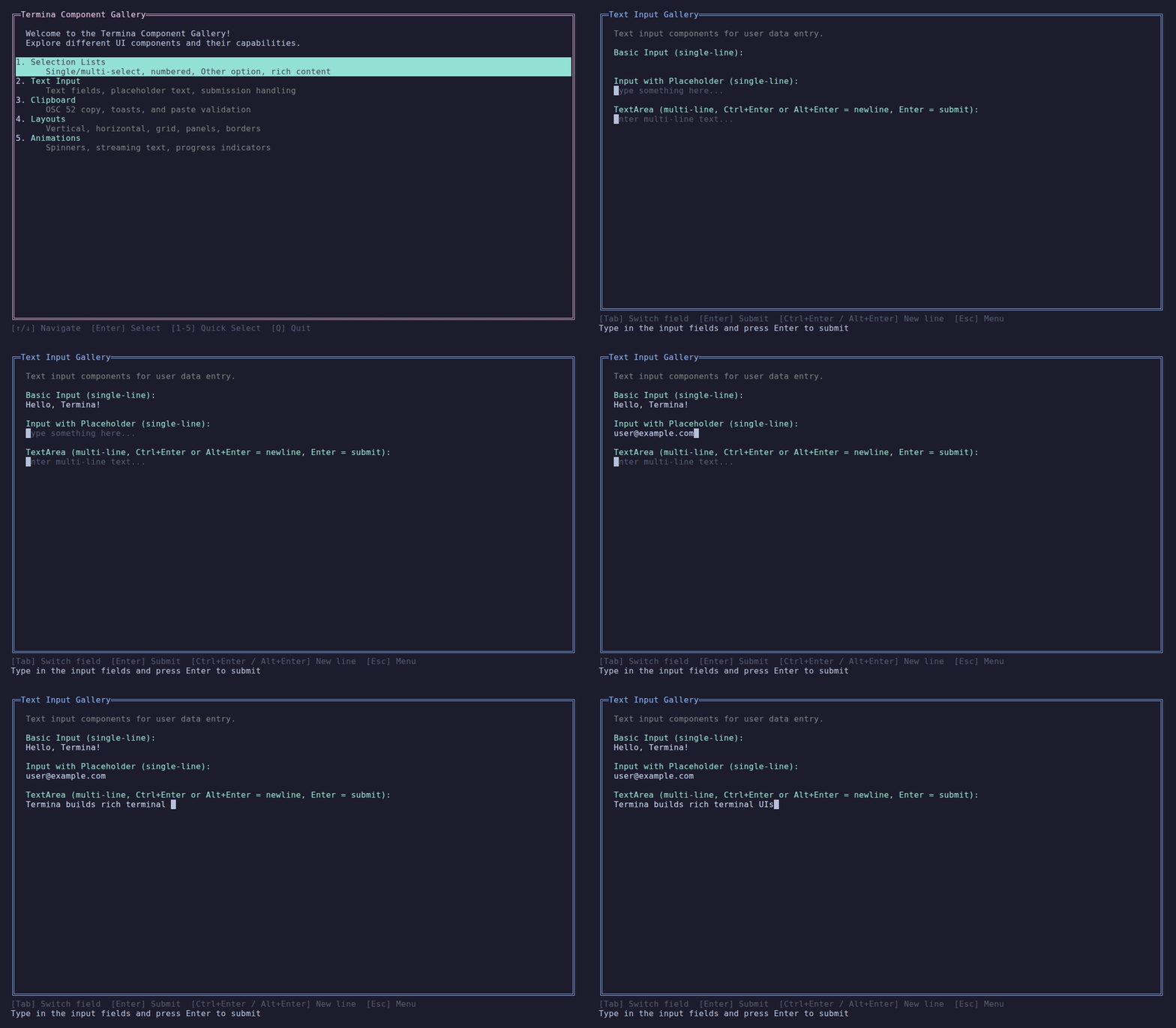
Single-line inputs and a multi-line text area.
Basic Usage
var input = new TextInputNode()
    .WithPlaceholder("Enter text...");

// Handle submission
input.Submitted.Subscribe(text => Console.WriteLine($"Submitted: {text}"));Features
- Blinking cursor
- Text selection (Shift+Arrow keys)
- Word-by-word navigation (Ctrl+Arrow)
- Password masking
- Max length validation
- Placeholder text
Keyboard Shortcuts
| Key | Action |
|---|---|
←/→ | Move cursor |
Ctrl+←/→ | Move by word |
Shift+←/→ | Select text |
Home/End | Jump to start/end |
Backspace | Delete before cursor |
Ctrl+Backspace | Delete word before |
Delete | Delete after cursor |
Ctrl+A | Select all |
↑/↓ | Navigate history (when enabled via WithHistory()) |
Enter | Submit (auto-records to history when enabled) |
Escape | Clear text |
Input History
TextInputNode has built-in, opt-in input history. When enabled, Up/Down arrow keys navigate through previous submissions, and Enter auto-records non-empty text.
var input = new TextInputNode()
    .WithPlaceholder("Enter command...")
    .WithHistory();          // Unlimited history

var input2 = new TextInputNode()
    .WithPlaceholder("Enter command...")
.WithHistory(maxEntries: 50); // Keep last 50 entriesHistory is off by default — existing behavior is unchanged unless you call WithHistory().
Programmatic History
Use AddHistory() for submissions that bypass the normal Enter flow:
// E.g., custom prompts from a SelectionListNode's "Other" option
input.AddHistory(customPrompt);History Keyboard Shortcuts
| Key | Action |
|---|---|
↑ | Recall previous entry (saves current input on first press) |
↓ | Recall next entry (restores saved input when past the end) |
Pre-filled Values
Assigning Text does not move the cursor. A new input keeps the cursor at position 0, so the first typed character would land before the default value. Call MoveCursorToEnd() after the assignment to start with the cursor after the text:
var endpoint = new TextInputNode();
endpoint.Text = "http://localhost:11434";
endpoint.MoveCursorToEnd();Text keeps the cursor where it is on purpose. A binding that writes Text back while the user types does not make the cursor jump.
CursorPosition is a UTF-16 index into the editable text, the text after the last committed segment. It is not an index into Text. A multi-line paste commits the text before it, and the paste itself, as segments the cursor cannot enter. For example, when Text is abc[Pasted 2 lines, 5 chars] def, the editable text is def and the valid range is 0 to 4. A multi-line value that you assign to Text becomes a paste summary, so the editable text is empty and the only valid position is 0. The setter moves a position inside a surrogate pair or a grapheme cluster to the start of that element and clamps other out-of-range values. Like the Text setter, it clears the selection and invalidates the node even when the position does not change, and it does not raise TextChanged. A focused node shows the cursor and restarts the blink cycle. It works before the node is attached or focused.
Password Mode
new TextInputNode()
    .AsPassword()        // Use default mask '•'

new TextInputNode()
.AsPassword('*') // Use custom mask characterStyling
new TextInputNode()
    .WithForeground(Color.White)
    .WithBackground(Color.Blue)
.WithPlaceholder("Type here...")Colors
| Property | Default | Description |
|---|---|---|
Foreground | terminal default | Text color |
Background | terminal default | Background color |
PlaceholderColor | BrightBlack | Placeholder text color |
CursorColor | White | Cursor background color |
SelectionColor | Blue | Selection background color |
Handling Input
TextInputNode is a layout node that should be owned by the Page. There are two patterns for input handling:
Pattern 1: Inside a Modal (Recommended)
When TextInputNode is inside a Modal, Focus automatically routes input:
public class MyPage : ReactivePage<MyViewModel>
{
    private TextInputNode _textInput = null!;
    private ModalNode _modal = null!;

    protected override void OnBound()
    {
        _textInput = new TextInputNode()
            .WithPlaceholder("Enter command...");
        _modal = Layouts.Modal().WithContent(_textInput);

        _textInput.Submitted
            .Subscribe(text => ViewModel.OnTextSubmitted(text))
            .DisposeWith(Subscriptions);

        // When showing modal, Focus handles input routing automatically
        ViewModel.IsShowingModalChanged
            .Where(show => show)
            .Subscribe(_ => Focus.PushFocus(_modal))
            .DisposeWith(Subscriptions);
    }
}Pattern 2: Always-Visible Input
For always-visible text inputs, route input via ViewModel.Input:
public class MyPage : ReactivePage<MyViewModel>
{
    private TextInputNode _promptInput = null!;

    protected override void OnBound()
    {
        _promptInput = new TextInputNode()
            .WithPlaceholder("Enter command...");

        // Route input from ViewModel to the text input
        ViewModel.Input.OfType<IInputEvent, KeyPressed>()
            .Subscribe(key => _promptInput.HandleInput(key.KeyInfo))
            .DisposeWith(Subscriptions);

        // Handle submission
        _promptInput.Submitted
            .Subscribe(text => {
                ViewModel.OnTextSubmitted(text);
                _promptInput.Clear();
            })
            .DisposeWith(Subscriptions);
    }
}Paste Handling
TextInputNode implements IPasteReceiver and automatically handles bracketed paste mode. When the user pastes text from the clipboard, Termina detects the terminal's paste escape sequences and delivers the content as a single PasteEvent rather than individual key presses.
In Termina 0.11.0, focused paste routing is covered by real terminal conformance tests for direct terminals, tmux, kitty, and kitty plus tmux. See the 0.11.0 upgrade advisory if your app needs users to copy text from the screen and paste it into a Termina input.
How It Works
- The user pastes text (Ctrl+V or right-click paste)
- The terminal wraps the content in
ESC[200~...ESC[201~markers - Termina detects the markers and emits a
PasteEvent TextInputNodeshows a summary:[Pasted 500 lines, 12345 chars]- On Enter, the full paste content (with newlines preserved) is submitted
- On any editing action (typing, backspace, delete, escape), the paste is cleared
This prevents multi-line pastes from triggering individual submissions for each line — a common issue in terminal applications.
// Paste handling is automatic — no additional setup needed
var input = new TextInputNode()
    .WithPlaceholder("Paste or type here...");

// Submitted receives the full paste content when Enter is pressed
input.Submitted.Subscribe(text =>
{
    // 'text' contains the full paste with newlines preserved
    Console.WriteLine($"Received {text.Length} chars");
});Paste in ViewModels
If you need to handle paste events at the ViewModel level (e.g., when no TextInputNode has focus):
Input.OfType<PasteEvent>()
    .Subscribe(paste =>
    {
        // paste.Content contains the full pasted text
        ProcessPastedContent(paste.Content);
    })
.DisposeWith(Subscriptions);Custom Input Components
If you build a custom focusable input node, implement IPasteReceiver so paste content goes directly to the focused component:
public sealed class CustomInputNode : LayoutNode, IFocusable, IPasteReceiver
{
    public bool HandlePaste(PasteEvent paste)
    {
        if (string.IsNullOrEmpty(paste.Content))
            return false;

        InsertTextAtCursor(paste.Content);
        return true;
    }
}Observables
| Observable | Type | Description |
|---|---|---|
TextChanged | Observable<string> | Emits when text changes |
Submitted | Observable<string> | Emits when Enter is pressed |
Invalidated | Observable<Unit> | Emits when redraw is needed |
API Reference
Constructor
public TextInputNode(int cursorBlinkMs = 530)Inputs attached to a page layout tree receive runtime context automatically, so cursor-blink invalidation is delivered on the Termina render loop. For deterministic component tests, set a LayoutRuntimeContext before focusing the node.
Properties
| Property | Type | Default | Description |
|---|---|---|---|
Text | string | "" | Current text value |
Placeholder | string? | null | Placeholder text |
MaxLength | int | 0 | Max length (0 = unlimited) |
IsPassword | bool | false | Password mode |
PasswordChar | char | '•' | Mask character |
HasSelection | bool | - | Has selected text |
SelectedText | string | - | Currently selected text |
CursorPosition | int | 0 | Cursor as a UTF-16 index into the editable text (clamped, clears selection) |
Methods
| Method | Description |
|---|---|
WithHistory(int maxEntries = 0) | Enable built-in input history (0 = unlimited) |
AddHistory(string entry) | Programmatically add a history entry (no-op when disabled) |
HandleInput(ConsoleKeyInfo) | Process a key press |
HandlePaste(PasteEvent) | Handle bracketed paste (implements IPasteReceiver) |
MoveCursorToEnd() | Move the cursor after the last editable character |
Clear() | Clear text and reset cursor |
Start() | Start cursor animation |
Stop() | Stop cursor animation |
Source Code
View TextInputNode implementation
// Copyright (c) Petabridge, LLC. All rights reserved.
// Licensed under the Apache 2.0 license. See LICENSE file in the project root for full license information.

using Termina.Rendering;
using Termina.Terminal;

namespace Termina.Layout;

/// <summary>
/// A single-line text input node with horizontal scrolling.
/// Supports optional built-in input history via <see cref="WithHistory"/>.
/// </summary>
public sealed class TextInputNode : TextInputBaseNode
{
    private int _scrollOffset;

    public TextInputNode(int cursorBlinkMs = 530)
        : base(cursorBlinkMs)
    {
        HeightConstraint = new SizeConstraint.Fixed(1);
        WidthConstraint = new SizeConstraint.Fill();
    }

    /// <summary>
    /// Set placeholder text.
    /// </summary>
    public TextInputNode WithPlaceholder(string placeholder)
    {
        Placeholder = placeholder;
        return this;
    }

    /// <summary>
    /// Set foreground color.
    /// </summary>
    public TextInputNode WithForeground(Color color)
    {
        Foreground = color;
        return this;
    }

    /// <summary>
    /// Set background color.
    /// </summary>
    public TextInputNode WithBackground(Color color)
    {
        Background = color;
        return this;
    }

    /// <summary>
    /// Set max length.
    /// </summary>
    public TextInputNode WithMaxLength(int length)
    {
        MaxLength = length;
        return this;
    }

    /// <summary>
    /// Enable password mode.
    /// </summary>
    public TextInputNode AsPassword(char maskChar = '\u2022')
    {
        IsPassword = true;
        PasswordChar = maskChar;
        return this;
    }

    /// <summary>
    /// Enable built-in input history. When enabled, Up/Down arrow keys navigate
    /// through previous submissions, and Enter auto-records non-empty text.
    /// </summary>
    /// <param name="maxEntries">Maximum history entries to keep (0 = unlimited).</param>
    public TextInputNode WithHistory(int maxEntries = 0)
    {
        EnableHistory(maxEntries);
        return this;
    }

    /// <inheritdoc />
    public override void Clear()
    {
        _scrollOffset = 0;
        base.Clear();
    }

    /// <inheritdoc />
    public override Size Measure(Size available)
    {
        var prefixWidth = DisplayWidth.GetColumnCount(CommittedDisplayPrefix);
        var width = WidthConstraint.Compute(available.Width, prefixWidth + DisplayWidth.GetColumnCount(_text) + 1, available.Width);
        return new Size(width, 1);
    }

    /// <inheritdoc />
    public override void Render(IRenderContext context, Rect bounds)
    {
        if (!bounds.HasArea)
            return;

        var inputContext = context.CreateSubContext(bounds);

        if (Background.HasValue)
        {
            inputContext.SetBackground(Background.Value);
            inputContext.Fill(0, 0, bounds.Width, bounds.Height, ' ');
            inputContext.ResetColors();
        }

        var prefix = CommittedDisplayPrefix;
        var prefixWidth = DisplayWidth.GetColumnCount(prefix);
        var activeText = _text;

        if (IsPassword && activeText.Length > 0)
        {
            activeText = new string(PasswordChar, activeText.Length);
        }

        var fullDisplayText = prefix + activeText;
        var displayCursor = prefixWidth + DisplayWidth.CursorPositionToColumn(activeText, _cursorPosition);

        if (fullDisplayText.Length == 0 && !string.IsNullOrEmpty(Placeholder))
        {
            inputContext.SetForeground(PlaceholderColor);
            if (Background.HasValue)
                inputContext.SetBackground(Background.Value);
            var placeholder = DisplayWidth.GetColumnCount(Placeholder) > bounds.Width
                ? DisplayWidth.TruncateToColumns(Placeholder, bounds.Width)
                : Placeholder;
            inputContext.WriteAt(0, 0, placeholder);
            inputContext.ResetColors();

            if (_cursorVisible)
            {
                inputContext.SetBackground(CursorColor);
                inputContext.WriteAt(0, 0, ' ');
                inputContext.ResetColors();
            }
            return;
        }

        var cursorTextWidth = DisplayWidth.GetColumnCount(DisplayWidth.GetTextElementAt(activeText, _cursorPosition));

        if (displayCursor < _scrollOffset)
        {
            _scrollOffset = displayCursor;
        }
        else if (displayCursor + cursorTextWidth > _scrollOffset + bounds.Width)
        {
            _scrollOffset = displayCursor + cursorTextWidth - bounds.Width;
        }

        var visStart = _scrollOffset;
        var visEnd = _scrollOffset + bounds.Width;

        var segColumnOffset = 0;
        foreach (var seg in _committedSegments)
        {
            var segStart = segColumnOffset;
            var segWidth = DisplayWidth.GetColumnCount(seg.DisplayText);
            var segEnd = segStart + segWidth;

            var drawStart = Math.Max(segStart, visStart);
            var drawEnd = Math.Min(segEnd, visEnd);

            if (drawStart < drawEnd)
            {
                if (seg.Kind == SegmentKind.Pasted)
                    inputContext.SetForeground(Color.BrightBlack);
                else if (Foreground.HasValue)
                    inputContext.SetForeground(Foreground.Value);
                else
                    inputContext.ResetColors();

                if (Background.HasValue)
                    inputContext.SetBackground(Background.Value);

                WriteVisibleText(inputContext, seg.DisplayText, segStart, _scrollOffset, drawStart, drawEnd);
            }

            segColumnOffset = segEnd;
        }

        var activeStart = prefixWidth;
        var activeEnd = prefixWidth + DisplayWidth.GetColumnCount(activeText);
        var activeDrawStart = Math.Max(activeStart, visStart);
        var activeDrawEnd = Math.Min(activeEnd, visEnd);

        if (activeDrawStart < activeDrawEnd)
        {
            inputContext.ResetColors();
            if (Foreground.HasValue)
                inputContext.SetForeground(Foreground.Value);
            if (Background.HasValue)
                inputContext.SetBackground(Background.Value);

            if (HasSelection)
            {
                var selStart = Math.Min(_selectionStart, _cursorPosition) + prefixWidth;
                var selEnd = Math.Max(_selectionStart, _cursorPosition) + prefixWidth;
                var activeColumn = activeStart;

                foreach (var cell in DisplayWidth.EnumerateCells(activeText))
                {
                    var cellStart = activeColumn;
                    var cellEnd = cellStart + cell.ColumnWidth;
                    activeColumn = cellEnd;

                    if (cellEnd <= activeDrawStart || cellStart >= activeDrawEnd)
                        continue;

                    if (cellStart < activeDrawStart || cellEnd > activeDrawEnd)
                        continue;

                    var textIndex = cell.StartIndex;
                    if (textIndex >= selStart - prefixWidth && textIndex < selEnd - prefixWidth)
                    {
                        inputContext.SetBackground(SelectionColor);
                    }
                    else
                    {
                        if (Background.HasValue)
                            inputContext.SetBackground(Background.Value);
                        else
                            inputContext.ResetColors();
                        if (Foreground.HasValue)
                            inputContext.SetForeground(Foreground.Value);
                    }

                    inputContext.WriteAt(cellStart - _scrollOffset, 0, cell.Text);
                }
            }
            else
            {
                WriteVisibleText(inputContext, activeText, activeStart, _scrollOffset, activeDrawStart, activeDrawEnd);
            }
        }

        inputContext.ResetColors();

        if (_cursorVisible)
        {
            var cursorX = displayCursor - _scrollOffset;
            if (cursorX >= 0 && cursorX < bounds.Width)
            {
                inputContext.SetBackground(CursorColor);
                inputContext.SetForeground(Background ?? Color.Black);
                var cursorText = _cursorPosition < activeText.Length
                    ? DisplayWidth.GetTextElementAt(activeText, _cursorPosition)
                    : " ";
                inputContext.WriteAt(cursorX, 0, cursorText);
                inputContext.ResetColors();
            }
        }
    }

    /// <summary>
    /// Resets the horizontal scroll offset in addition to base escape behavior.
    /// </summary>
    protected override void OnTextBufferChanged()
    {
        if (_text.Length == 0 || _cursorPosition == 0)
        {
            _scrollOffset = 0;
        }
        base.OnTextBufferChanged();
    }

    private static void WriteVisibleText(
        IRenderContext context,
        string text,
        int absoluteStartColumn,
        int scrollOffset,
        int drawStart,
        int drawEnd)
    {
        var column = absoluteStartColumn;
        foreach (var cell in DisplayWidth.EnumerateCells(text))
        {
            var cellStart = column;
            var cellEnd = cellStart + cell.ColumnWidth;
            column = cellEnd;

            if (cellEnd <= drawStart || cellStart >= drawEnd)
                continue;

            if (cellStart < drawStart || cellEnd > drawEnd)
                continue;

            context.WriteAt(cellStart - scrollOffset, 0, cell.Text);
        }
    }
}