
Counter App Tutorial
Build a reactive counter application that demonstrates Termina's core concepts.
What You'll Build
A counter application with:
- Increment/decrement with arrow keys
- Text input for messages
- Real-time status updates
- Escape to quit
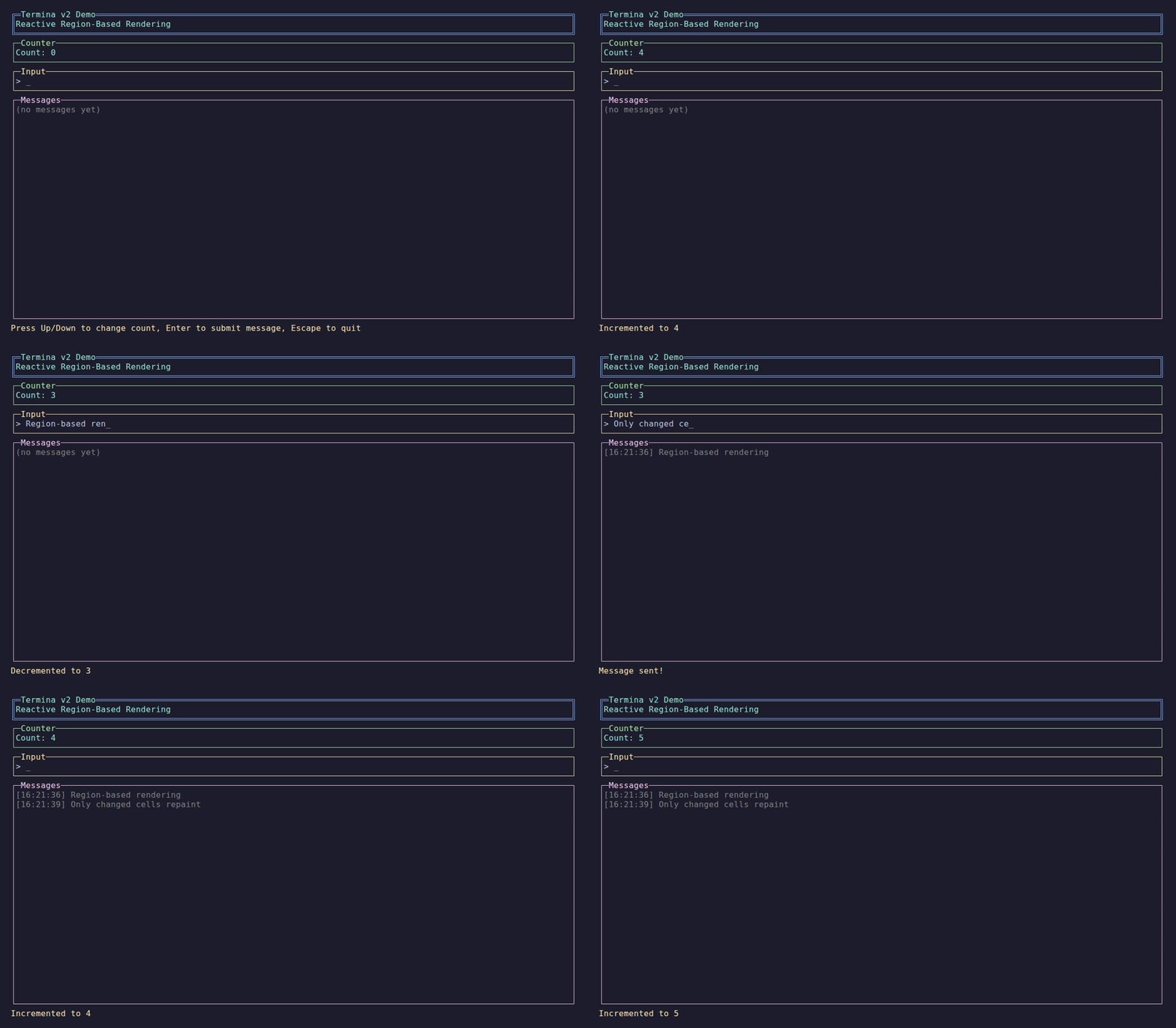
The finished counter app.
Project Setup
Create a new console application:
dotnet new console -n CounterDemo
cd CounterDemo
dotnet add package Termina
dotnet add package Microsoft.Extensions.HostingStep 1: Create the ViewModel
The ViewModel holds your application state and handles input.
View complete CounterViewModel.cs
// Copyright (c) Petabridge, LLC. All rights reserved.
// Licensed under the Apache 2.0 license. See LICENSE file in the project root for full license information.

using R3;
using Termina.Input;
using Termina.Reactive;

namespace Termina.Demo.RegionBased;

/// <summary>
/// ViewModel for the counter demo.
/// Demonstrates reactive properties with the v2 rendering infrastructure.
/// </summary>
public class CounterViewModel : ReactiveViewModel
{
    public ReactiveProperty<int> Count { get; } = new(0);
    public ReactiveProperty<string> StatusMessage { get; } = new("Press Up/Down to change count, Enter to submit message, Escape to quit");
    public ReactiveProperty<string> InputText { get; } = new("");
    public ReactiveProperty<List<string>> Messages { get; } = new(new());

    public override void OnActivated()
    {
        // Subscribe to keyboard input
        Input.OfType<IInputEvent, KeyPressed>()
            .Subscribe(HandleKeyPress)
            .DisposeWith(Subscriptions);
    }

    private void HandleKeyPress(KeyPressed key)
    {
        switch (key.KeyInfo.Key)
        {
            case ConsoleKey.UpArrow:
                Count.Value++;
                StatusMessage.Value = $"Incremented to {Count.Value}";
                break;

            case ConsoleKey.DownArrow:
                Count.Value--;
                StatusMessage.Value = $"Decremented to {Count.Value}";
                break;

            case ConsoleKey.Enter:
                if (!string.IsNullOrWhiteSpace(InputText.Value))
                {
                    var newMessages = new List<string>(Messages.Value)
                    {
                        $"[{DateTime.Now:HH:mm:ss}] {InputText.Value}"
                    };
                    // Keep last 8 messages
                    if (newMessages.Count > 8)
                        newMessages.RemoveAt(0);
                    Messages.Value = newMessages;
                    InputText.Value = "";
                    StatusMessage.Value = "Message sent!";
                }
                break;

            case ConsoleKey.Backspace:
                if (InputText.Value.Length > 0)
                    InputText.Value = InputText.Value[..^1];
                break;

            case ConsoleKey.Escape:
                Shutdown();
                break;

            default:
                // Handle printable characters for input
                if (key.KeyInfo.KeyChar >= 32 && key.KeyInfo.KeyChar < 127)
                {
                    InputText.Value += key.KeyInfo.KeyChar;
                }
                break;
        }
    }

    public override void Dispose()
    {
        Count.Dispose();
        StatusMessage.Dispose();
        InputText.Dispose();
        Messages.Dispose();
        base.Dispose();
    }
}Key Points
Reactive Properties
public ReactiveProperty<int> Count { get; } = new(0);
public ReactiveProperty<string> StatusMessage { get; } = new("Press Up/Down...");ReactiveProperty<T> provides:
- A
.Valueproperty for reading and writing state - Built-in
Observable<T>for UI binding — subscribe directly to the property - Built-in
DistinctUntilChanged— only emits when the value actually changes
Input Handling
public override void OnActivated()
{
    Input.OfType<IInputEvent, KeyPressed>()
        .Subscribe(HandleKeyPress)
        .DisposeWith(Subscriptions);
}Subscribe to the Input observable in OnActivated(). Use DisposeWith(Subscriptions) for automatic cleanup. Note: R3's OfType requires both source and target type parameters.
Step 2: Create the Page
The Page builds the layout from ViewModel state.
View complete CounterPage.cs
// Copyright (c) Petabridge, LLC. All rights reserved.
// Licensed under the Apache 2.0 license. See LICENSE file in the project root for full license information.

using R3;
using Termina.Extensions;
using Termina.Layout;
using Termina.Reactive;
using Termina.Rendering;
using Termina.Terminal;

namespace Termina.Demo.RegionBased;

/// <summary>
/// Page for the counter demo.
/// Demonstrates the declarative layout API with reactive bindings.
/// </summary>
public class CounterPage : ReactivePage<CounterViewModel>
{
    public override ILayoutNode BuildLayout()
    {
        return Layouts.Vertical()
            // Header panel
            .WithChild(
                new PanelNode()
                    .WithTitle("Termina v2 Demo")
                    .WithBorder(BorderStyle.Double)
                    .WithBorderColor(Color.Blue)
                    .WithTitleColor(Color.BrightCyan)
                    .WithContent(
                        new TextNode("Reactive Region-Based Rendering")
                            .WithForeground(Color.Cyan))
                    .Height(3))
            // Counter display - reactive binding
            .WithChild(
                new PanelNode()
                    .WithTitle("Counter")
                    .WithBorder(BorderStyle.Single)
                    .WithBorderColor(Color.Green)
                    .WithContent(
                        ViewModel.Count
                            .Select<int, ILayoutNode>(count => new TextNode($"Count: {count}")
                                .WithForeground(Color.BrightCyan))
                            .AsLayout())
                    .Height(3))
            // Input panel - reactive binding (NoWrap for single-line input)
            .WithChild(
                new PanelNode()
                    .WithTitle("Input")
                    .WithBorder(BorderStyle.Single)
                    .WithBorderColor(Color.Yellow)
                    .WithContent(
                        ViewModel.InputText
                            .Select<string, ILayoutNode>(text => new TextNode($"> {text}_")
                                .WithForeground(Color.White)
                                .NoWrap())
                            .AsLayout())
                    .Height(3))
            // Messages panel - reactive binding
            .WithChild(
                new PanelNode()
                    .WithTitle("Messages")
                    .WithBorder(BorderStyle.Single)
                    .WithBorderColor(Color.Magenta)
                    .WithContent(
                        ViewModel.Messages
                            .Select<List<string>, ILayoutNode>(messages => new TextNode(messages.Count > 0
                                ? string.Join("\n", messages)
                                : "(no messages yet)")
                                .WithForeground(Color.Gray))
                            .AsLayout())
                    .Fill())
            // Status bar at the bottom - reactive binding with instructions
            // Note: Height(1) means only 1 row is available - any wrapped text will be clipped
            .WithChild(
                Layouts.Horizontal()
                    .WithChild(
                        ViewModel.StatusMessage
                            .Select<string, ILayoutNode>(status => new TextNode(status)
                                .WithForeground(Color.BrightYellow)
                                .NoWrap())  // Status should truncate, not wrap
                            .AsLayout()
                            .Fill())
                    .WithChild(
                        new TextNode("[↑/↓] Count [Enter] Send [Esc] Quit")
                            .WithForeground(Color.BrightBlack)
                            .NoWrap()      // Instructions should truncate at narrow widths
                            .WidthAuto())  // Take only the width needed
                    .Height(1));
    }
}Key Points
Reactive Bindings
ViewModel.Count
    .Select<int, ILayoutNode>(count => new TextNode($"Count: {count}"))
.AsLayout()ReactiveProperty<T> is an Observable<T>, so you subscribe directly to it. The AsLayout() extension creates a ReactiveLayoutNode that automatically updates when the value changes.
Layout Composition
return Layouts.Vertical()
    .WithChild(header.Height(3))
    .WithChild(counter.Height(3))
    .WithChild(messages.Fill())
.WithChild(status.Height(1));Build complex UIs by nesting layouts with size constraints.
Styling
new TextNode("Title")
    .WithForeground(Color.Cyan)
.Bold()Chain style methods for formatted text.
Step 3: Wire Up the Host
View complete Program.cs
// Copyright (c) Petabridge, LLC. All rights reserved.
// Licensed under the Apache 2.0 license. See LICENSE file in the project root for full license information.

using Microsoft.Extensions.Hosting;
using Microsoft.Extensions.Logging;
using Termina.Demo.RegionBased;
using Termina.Hosting;
using Termina.Input;

// Check for --test flag (used in CI/CD to run scripted test and exit)
var testMode = args.Contains("--test");

var builder = Host.CreateApplicationBuilder(args);

// Suppress host/console logging so it doesn't bleed into the TUI's rendered output.
builder.Logging.SetMinimumLevel(LogLevel.Warning);

// Set up input source based on mode
VirtualInputSource? scriptedInput = null;
if (testMode)
{
    scriptedInput = new VirtualInputSource();
    builder.Services.AddTerminaVirtualInput(scriptedInput);
}

// Register Termina with the tree-based reactive page
builder.Services.AddTermina("/counter", termina =>
{
    termina.RegisterRoute<CounterPage, CounterViewModel>("/counter");
});

var host = builder.Build();

// Test mode - queue up scripted input then quit
if (testMode && scriptedInput != null)
{
    _ = Task.Run(async () =>
    {
        await Task.Delay(100); // Wait for initial render

        // Increment counter
        scriptedInput.EnqueueKey(ConsoleKey.UpArrow);
        scriptedInput.EnqueueKey(ConsoleKey.UpArrow);
        scriptedInput.EnqueueKey(ConsoleKey.UpArrow);
        await Task.Delay(50);

        // Decrement counter
        scriptedInput.EnqueueKey(ConsoleKey.DownArrow);
        await Task.Delay(50);

        // Type a message
        scriptedInput.EnqueueString("Hello from test!");
        await Task.Delay(50);
        scriptedInput.EnqueueKey(ConsoleKey.Enter);
        await Task.Delay(50);

        // Type another message
        scriptedInput.EnqueueString("Testing reactive v2");
        scriptedInput.EnqueueKey(ConsoleKey.Enter);
        await Task.Delay(50);

        // Quit
        scriptedInput.EnqueueKey(ConsoleKey.Escape);
        scriptedInput.Complete();
    });
}

await host.RunAsync();Key Points
Service Registration
builder.Services.AddTermina("/counter", termina =>
{
    termina.RegisterRoute<CounterPage, CounterViewModel>("/counter");
});Register your page and ViewModel with a route template.
Initial Route
The first argument to AddTermina specifies the starting route.
Run the App
dotnet runUse:
↑/↓to change the counter- Type text and press
Enterto add messages Escapeto quit
Complete Code
// Copyright (c) Petabridge, LLC. All rights reserved.
// Licensed under the Apache 2.0 license. See LICENSE file in the project root for full license information.

using R3;
using Termina.Input;
using Termina.Reactive;

namespace Termina.Demo.RegionBased;

/// <summary>
/// ViewModel for the counter demo.
/// Demonstrates reactive properties with the v2 rendering infrastructure.
/// </summary>
public class CounterViewModel : ReactiveViewModel
{
    public ReactiveProperty<int> Count { get; } = new(0);
    public ReactiveProperty<string> StatusMessage { get; } = new("Press Up/Down to change count, Enter to submit message, Escape to quit");
    public ReactiveProperty<string> InputText { get; } = new("");
    public ReactiveProperty<List<string>> Messages { get; } = new(new());

    public override void OnActivated()
    {
        // Subscribe to keyboard input
        Input.OfType<IInputEvent, KeyPressed>()
            .Subscribe(HandleKeyPress)
            .DisposeWith(Subscriptions);
    }

    private void HandleKeyPress(KeyPressed key)
    {
        switch (key.KeyInfo.Key)
        {
            case ConsoleKey.UpArrow:
                Count.Value++;
                StatusMessage.Value = $"Incremented to {Count.Value}";
                break;

            case ConsoleKey.DownArrow:
                Count.Value--;
                StatusMessage.Value = $"Decremented to {Count.Value}";
                break;

            case ConsoleKey.Enter:
                if (!string.IsNullOrWhiteSpace(InputText.Value))
                {
                    var newMessages = new List<string>(Messages.Value)
                    {
                        $"[{DateTime.Now:HH:mm:ss}] {InputText.Value}"
                    };
                    // Keep last 8 messages
                    if (newMessages.Count > 8)
                        newMessages.RemoveAt(0);
                    Messages.Value = newMessages;
                    InputText.Value = "";
                    StatusMessage.Value = "Message sent!";
                }
                break;

            case ConsoleKey.Backspace:
                if (InputText.Value.Length > 0)
                    InputText.Value = InputText.Value[..^1];
                break;

            case ConsoleKey.Escape:
                Shutdown();
                break;

            default:
                // Handle printable characters for input
                if (key.KeyInfo.KeyChar >= 32 && key.KeyInfo.KeyChar < 127)
                {
                    InputText.Value += key.KeyInfo.KeyChar;
                }
                break;
        }
    }

    public override void Dispose()
    {
        Count.Dispose();
        StatusMessage.Dispose();
        InputText.Dispose();
        Messages.Dispose();
        base.Dispose();
    }
}// Copyright (c) Petabridge, LLC. All rights reserved.
// Licensed under the Apache 2.0 license. See LICENSE file in the project root for full license information.
using R3;
using Termina.Extensions;
using Termina.Layout;
using Termina.Reactive;
using Termina.Rendering;
using Termina.Terminal;
namespace Termina.Demo.RegionBased;
/// <summary>
/// Page for the counter demo.
/// Demonstrates the declarative layout API with reactive bindings.
/// </summary>
public class CounterPage : ReactivePage<CounterViewModel>
{
public override ILayoutNode BuildLayout()
{
return Layouts.Vertical()
// Header panel
.WithChild(
new PanelNode()
.WithTitle("Termina v2 Demo")
.WithBorder(BorderStyle.Double)
.WithBorderColor(Color.Blue)
.WithTitleColor(Color.BrightCyan)
.WithContent(
new TextNode("Reactive Region-Based Rendering")
.WithForeground(Color.Cyan))
.Height(3))
// Counter display - reactive binding
.WithChild(
new PanelNode()
.WithTitle("Counter")
.WithBorder(BorderStyle.Single)
.WithBorderColor(Color.Green)
.WithContent(
ViewModel.Count
.Select<int, ILayoutNode>(count => new TextNode($"Count: {count}")
.WithForeground(Color.BrightCyan))
.AsLayout())
.Height(3))
// Input panel - reactive binding (NoWrap for single-line input)
.WithChild(
new PanelNode()
.WithTitle("Input")
.WithBorder(BorderStyle.Single)
.WithBorderColor(Color.Yellow)
.WithContent(
ViewModel.InputText
.Select<string, ILayoutNode>(text => new TextNode($"> {text}_")
.WithForeground(Color.White)
.NoWrap())
.AsLayout())
.Height(3))
// Messages panel - reactive binding
.WithChild(
new PanelNode()
.WithTitle("Messages")
.WithBorder(BorderStyle.Single)
.WithBorderColor(Color.Magenta)
.WithContent(
ViewModel.Messages
.Select<List<string>, ILayoutNode>(messages => new TextNode(messages.Count > 0
? string.Join("\n", messages)
: "(no messages yet)")
.WithForeground(Color.Gray))
.AsLayout())
.Fill())
// Status bar at the bottom - reactive binding with instructions
// Note: Height(1) means only 1 row is available - any wrapped text will be clipped
.WithChild(
Layouts.Horizontal()
.WithChild(
ViewModel.StatusMessage
.Select<string, ILayoutNode>(status => new TextNode(status)
.WithForeground(Color.BrightYellow)
.NoWrap()) // Status should truncate, not wrap
.AsLayout()
.Fill())
.WithChild(
new TextNode("[↑/↓] Count [Enter] Send [Esc] Quit")
.WithForeground(Color.BrightBlack)
.NoWrap() // Instructions should truncate at narrow widths
.WidthAuto()) // Take only the width needed
.Height(1));
}
}// Copyright (c) Petabridge, LLC. All rights reserved.
// Licensed under the Apache 2.0 license. See LICENSE file in the project root for full license information.
using Microsoft.Extensions.Hosting;
using Microsoft.Extensions.Logging;
using Termina.Demo.RegionBased;
using Termina.Hosting;
using Termina.Input;
// Check for --test flag (used in CI/CD to run scripted test and exit)
var testMode = args.Contains("--test");
var builder = Host.CreateApplicationBuilder(args);
// Suppress host/console logging so it doesn't bleed into the TUI's rendered output.
builder.Logging.SetMinimumLevel(LogLevel.Warning);
// Set up input source based on mode
VirtualInputSource? scriptedInput = null;
if (testMode)
{
scriptedInput = new VirtualInputSource();
builder.Services.AddTerminaVirtualInput(scriptedInput);
}
// Register Termina with the tree-based reactive page
builder.Services.AddTermina("/counter", termina =>
{
termina.RegisterRoute<CounterPage, CounterViewModel>("/counter");
});
var host = builder.Build();
// Test mode - queue up scripted input then quit
if (testMode && scriptedInput != null)
{
_ = Task.Run(async () =>
{
await Task.Delay(100); // Wait for initial render
// Increment counter
scriptedInput.EnqueueKey(ConsoleKey.UpArrow);
scriptedInput.EnqueueKey(ConsoleKey.UpArrow);
scriptedInput.EnqueueKey(ConsoleKey.UpArrow);
await Task.Delay(50);
// Decrement counter
scriptedInput.EnqueueKey(ConsoleKey.DownArrow);
await Task.Delay(50);
// Type a message
scriptedInput.EnqueueString("Hello from test!");
await Task.Delay(50);
scriptedInput.EnqueueKey(ConsoleKey.Enter);
await Task.Delay(50);
// Type another message
scriptedInput.EnqueueString("Testing reactive v2");
scriptedInput.EnqueueKey(ConsoleKey.Enter);
await Task.Delay(50);
// Quit
scriptedInput.EnqueueKey(ConsoleKey.Escape);
scriptedInput.Complete();
});
}
await host.RunAsync();Next Steps
- Add more pages and navigation
- Learn about size constraints for responsive layouts
- Build a todo list with list management