
Building a Setup Wizard
This tutorial walks through building a 3-step setup wizard using WizardNode<TStep>, FocusPolicy.FirstFocusable, and Tab cycling. WizardNode uses KeyedDynamicLayoutNode<int> internally for automatic step content caching — each step's content factory is called once and the result is cached for reuse when navigating back.
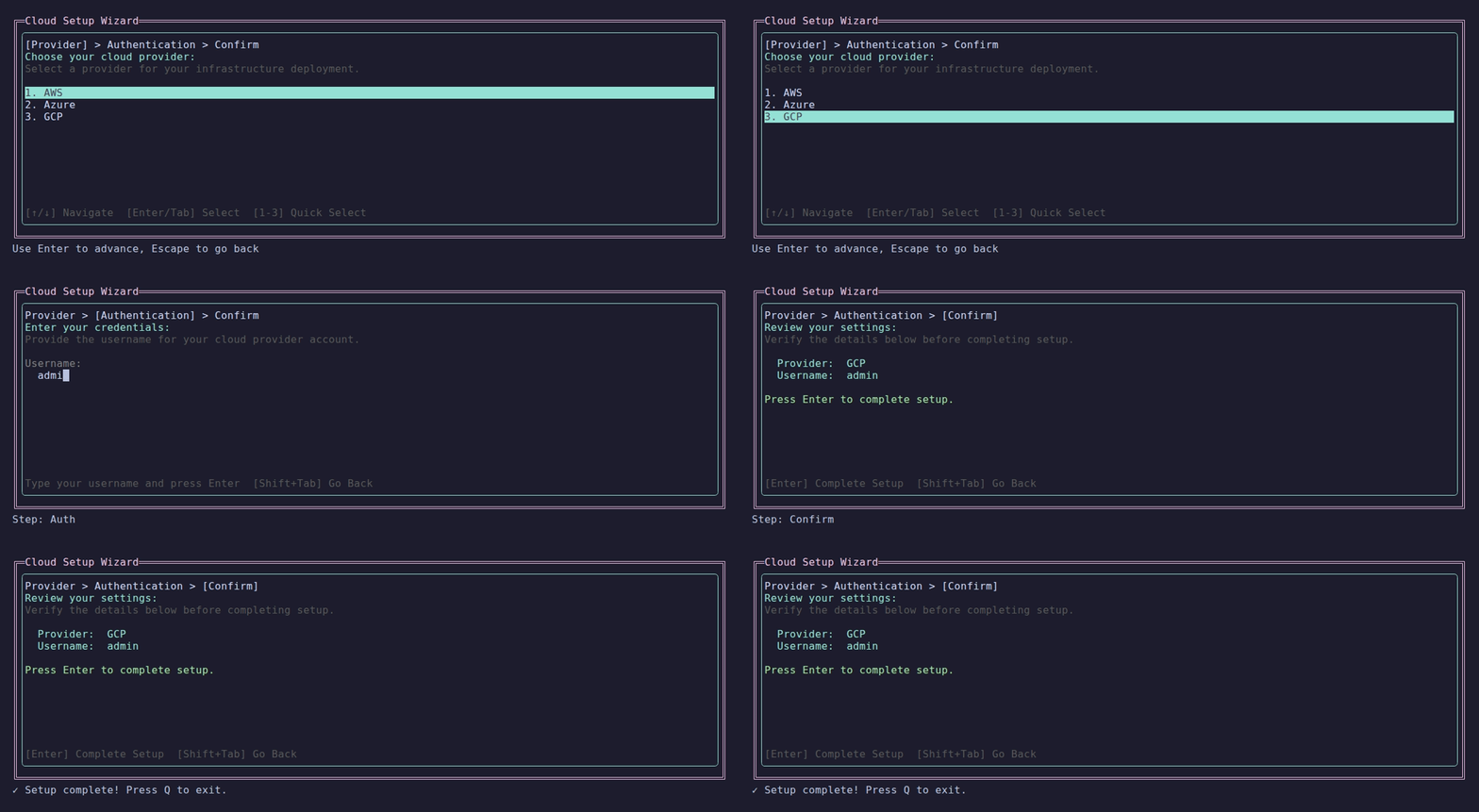
The finished setup wizard.
Define the Steps
csharp
public enum SetupStep
{
    Provider,
    Auth,
    Confirm
}Create the ViewModel
csharp
public class SetupWizardViewModel : ReactiveViewModel
{
    public ReactiveProperty<string> SelectedProvider { get; } = new("None");
    public ReactiveProperty<string> Username { get; } = new("");
    public ReactiveProperty<string> Password { get; } = new("");

    public override void Dispose()
    {
        SelectedProvider.Dispose();
        Username.Dispose();
        Password.Dispose();
        base.Dispose();
    }
}Create the Page
csharp
public class SetupWizardPage : ReactivePage<SetupWizardViewModel>
{
    public SetupWizardPage()
    {
        FocusPolicy = FocusPolicy.FirstFocusable;
    }

    public override ILayoutNode BuildLayout()
    {
        var wizard = Layouts.Wizard<SetupStep>()
            .WithStep(SetupStep.Provider, "Provider", BuildProviderStep,
                helpText: "Choose your cloud provider")
            .WithStep(SetupStep.Auth, "Authentication", BuildAuthStep,
                helpText: "Enter your credentials")
            .WithStep(SetupStep.Confirm, "Confirm", BuildConfirmStep,
                helpText: "Press Enter to complete setup")
            .WithProgressStyle(WizardProgressStyle.Arrow)
            .WithBorder(BorderStyle.Rounded)
            .Fill();

        // Subscribe to completion
        wizard.Completed.Subscribe(_ => Shutdown());

        return wizard;
    }

    public override void OnNavigatedTo()
    {
        base.OnNavigatedTo();
        // WizardNode handles Tab/Shift+Tab for step navigation automatically
        Focus.PushFocus(wizard);
    }

    private ILayoutNode BuildProviderStep()
    {
        var list = Layouts.SelectionList("AWS", "Azure", "GCP")
            .WithMode(SelectionMode.Single);

        list.SelectionConfirmed.Subscribe(items =>
        {
            if (items.Count > 0)
                ViewModel.SelectedProvider.Value = items[0];
        });

        return list;
    }

    private ILayoutNode BuildAuthStep()
    {
        var username = new TextInputNode().WithPlaceholder("Username");
        var password = new TextInputNode().WithPlaceholder("Password");

        username.Submitted.Subscribe(text =>
            ViewModel.Username.Value = text);
        password.Submitted.Subscribe(text =>
            ViewModel.Password.Value = text);

        return Layouts.Vertical(
            new TextNode("Username:"),
            username,
            new TextNode("Password:"),
            password
        ).WithSpacing(1);
    }

    private ILayoutNode BuildConfirmStep()
    {
        return Layouts.Vertical(
            new TextNode("Review your settings:"),
            ViewModel.SelectedProvider
                .Select<string, ILayoutNode>(p => new TextNode($"  Provider: {p}"))
                .AsLayout(RenderFrameProvider),
            ViewModel.Username
                .Select<string, ILayoutNode>(u => new TextNode($"  Username: {u}"))
                .AsLayout(RenderFrameProvider),
            new TextNode(""),
            new TextNode("Press Enter to complete, Escape to go back.")
        );
    }
}Key Concepts Used
WizardNode<SetupStep>manages step navigation, progress display, and completionKeyedDynamicLayoutNode<int>(used internally by WizardNode) caches step content by index — navigating back reuses cached instances, preserving child stateFocusPolicy.FirstFocusableauto-focuses the first interactive control on each page visitBeforeAdvancecan be subscribed to for step validation (setargs.Cancel = trueto prevent navigation)
Wizard Navigation
| Key | Action |
|---|---|
| Enter | Advance to next step (or complete on last step) |
| Tab | Advance to next step |
| Escape | Go back to previous step |
| Shift+Tab | Go back to previous step |
Step Validation
Use BeforeAdvance to prevent advancement when required data is missing:
csharp
wizard.BeforeAdvance.Subscribe(args =>
{
    switch (args.CurrentStep)
    {
        case SetupStep.Provider when string.IsNullOrEmpty(ViewModel.SelectedProvider.Value):
            args.Cancel = true;
            ViewModel.StatusMessage.Value = "Please select a provider first";
            break;
        case SetupStep.Auth when string.IsNullOrEmpty(ViewModel.Username.Value):
            args.Cancel = true;
            ViewModel.StatusMessage.Value = "Please enter a username first";
            break;
    }
});Progress Styles
csharp
.WithProgressStyle(WizardProgressStyle.BlockBar)  // [====>    ] Step 2 of 3
.WithProgressStyle(WizardProgressStyle.Arrow)      // Provider > [Auth] > Confirm
.WithProgressStyle(WizardProgressStyle.Dots)       // [*] [*] [ ] Auth
.WithProgressStyle(WizardProgressStyle.None)       // No progress indicator