
GraphNode
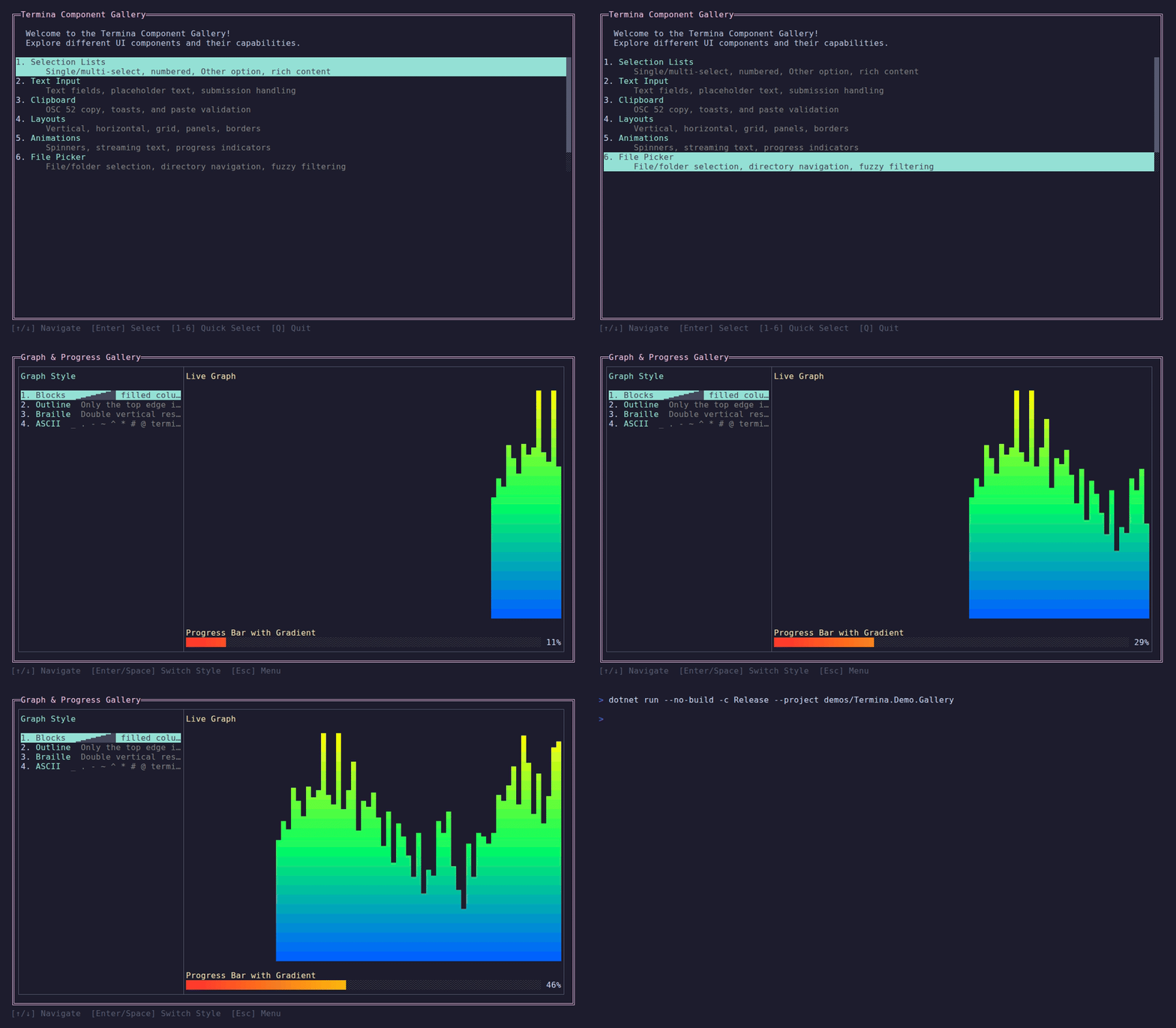
A reactive, self-invalidating layout node that renders live scrolling graphs with optional gradient coloring. Implements IAnimatedNode so only the graph region repaints — not the parent layout.
Demo — Live graph with gradient coloring, cycling through all 4 styles
Basic Usage
var graph = new GraphNode()
    .WithColor(Color.Cyan)
    .WithRange(0, 100);

graph.SetData([10, 40, 70, 100, 60, 30]);Graph Styles
Four rendering styles are available:
new GraphNode().WithStyle(GraphStyle.Blocks)   // ▁▂▃▄▅▆▇█ filled columns
new GraphNode().WithStyle(GraphStyle.Outline)  // Only the top edge drawn
new GraphNode().WithStyle(GraphStyle.Braille)  // Double vertical resolution
new GraphNode().WithStyle(GraphStyle.Ascii) // _ . - ~ ^ * # @ fallback| Style | Characters | Best for |
|---|---|---|
Blocks | ▁▂▃▄▅▆▇█ | General use, high contrast |
Outline | Top edge only | Sparse data, sparkline feel |
Braille | ⠀⢀⣀⣤⣶⣿ | Double vertical resolution per row |
Ascii | _ . - ~ ^ * # @ | Terminals without Unicode |
Gradient Coloring
Apply a gradient that maps color by row height:
var gradient = Gradient.Create(
    Color.FromRgb(0, 100, 255),   // blue at the bottom
    Color.FromRgb(0, 255, 100),   // green in the middle
    Color.FromRgb(255, 255, 0));  // yellow at the top

var graph = new GraphNode()
    .WithGradient(gradient)
.WithRange(0, 100);For a single color, use the convenience method:
new GraphNode().WithColor(Color.Green)Data-Driven Updates
SetData fires invalidation immediately so the graph repaints as soon as data arrives, independent of the internal timer interval:
Observable.Interval(TimeSpan.FromMilliseconds(200), TimeProvider.System)
    .ObserveOn(RenderFrameProvider)
    .Subscribe(_ =>
    {
        dataPoints.Add(GetNextValue());
        graph.SetData(dataPoints.ToArray());
});The graph renders the rightmost width data points (or width * 2 for Braille style). Earlier data scrolls off the left edge.
Internal Timer
The constructor accepts an interval for periodic self-invalidation. Set intervalMs: 0 to disable the internal timer entirely and rely only on SetData for repaints:
// Timer-driven refresh (default 500ms), invalidated on the Termina loop
new GraphNode(intervalMs: 500)

// Data-driven only — no timer overhead
new GraphNode(intervalMs: 0)Testable Timing
GraphNode receives timing through LayoutRuntimeContext. In app code this happens automatically when the graph is attached to a page layout tree. For component-level tests, set a test runtime context before activation.
API Reference
Constructor
public GraphNode(int intervalMs = 500)Methods
| Method | Description |
|---|---|
.WithStyle(GraphStyle) | Set rendering style |
.WithGradient(Gradient) | Apply gradient coloring by row |
.WithColor(Color) | Single-color convenience |
.WithRange(double min, double max) | Set data value range (default 0–100) |
.SetData(double[]) | Push data and trigger repaint |
.Start() | Start internal timer |
.Stop() | Stop internal timer |
GraphStyle Enum
| Style | Description |
|---|---|
Blocks | Filled block columns (default) |
Outline | Top edge only |
Braille | Double resolution braille dots |
Ascii | ASCII fallback characters |
Source Code
View GraphNode implementation
using R3;
using Termina.Rendering;
using Termina.Terminal;

namespace Termina.Layout;

/// <summary>
/// Reactive LayoutNode that renders a live scrolling graph with optional gradient coloring.
/// Uses IAnimatedNode (like SpinnerNode) so only this region is invalidated,
/// NOT the parent layout.
/// </summary>
public sealed class GraphNode : LayoutNode, IAnimatedNode, IInvalidatingNode
{
    private static readonly char[] BlockChars = [' ', '▁', '▂', '▃', '▄', '▅', '▆', '▇', '█'];
    private static readonly char[] OutlineChars = [' ', '▁', '▂', '▃', '▄', '▅', '▆', '▇', '▔'];
    private static readonly char[] AsciiChars = [' ', '_', '.', '-', '~', '^', '*', '#', '@'];

    private static readonly char[][] BrailleChars =
    [
        ['⠀', '⢀', '⢠', '⢰', '⢸'],
        ['⡀', '⣀', '⣠', '⣰', '⣸'],
        ['⡄', '⣄', '⣤', '⣴', '⣼'],
        ['⡆', '⣆', '⣦', '⣶', '⣾'],
        ['⡇', '⣇', '⣧', '⣷', '⣿'],
    ];

    private readonly Subject<Unit> _invalidated = new();
    private readonly int _intervalMs;
    private IDisposable? _timerSubscription;
    private double[] _data = [];
    private GraphStyle _style = GraphStyle.Blocks;
    private Gradient? _gradient;
    private double _minValue;
    private double _maxValue = 100;

    public Observable<Unit> Invalidated => _invalidated.AsObservable();
    public bool IsAnimating { get; private set; }

    public GraphNode(int intervalMs = 500)
    {
        _intervalMs = intervalMs;
    }

    /// <summary>
    /// Push new data to render. Immediately fires <see cref="Invalidated"/> so the node
    /// repaints as soon as data arrives, regardless of the internal timer interval.
    /// </summary>
    public GraphNode SetData(double[] data)
    {
        _data = data;
        _invalidated.OnNext(Unit.Default);
        return this;
    }

    public void Start()
    {
        if (IsAnimating || _intervalMs <= 0)
        {
            return;
        }

        var ticks = Observable.Interval(TimeSpan.FromMilliseconds(_intervalMs), GetTimeProvider());
        if (GetFrameProvider() is { } frameProvider)
            ticks = ticks.ObserveOn(frameProvider);

        _timerSubscription ??= ticks
            .Subscribe(_ => { _invalidated.OnNext(Unit.Default); });
        IsAnimating = true;
    }

    public override void SetRuntimeContext(LayoutRuntimeContext context)
    {
        var restart = IsAnimating;
        if (restart)
            Stop();

        base.SetRuntimeContext(context);

        if (restart)
            Start();
    }

    private TimeProvider GetTimeProvider() => RuntimeContext?.TimeProvider ?? TimeProvider.System;

    private FrameProvider? GetFrameProvider() => RuntimeContext?.RenderFrameProvider;

    public void Stop()
    {
        if (!IsAnimating)
        {
            return;
        }

        _timerSubscription?.Dispose();
        _timerSubscription = null;
        IsAnimating = false;
    }

    public GraphNode WithStyle(GraphStyle style)
    {
        _style = style;
        return this;
    }

    /// <summary>
    /// Apply a gradient for vertical coloring. Each row samples the gradient
    /// at <c>row / (height - 1)</c>.
    /// </summary>
    public GraphNode WithGradient(Gradient gradient)
    {
        _gradient = gradient;
        return this;
    }

    /// <summary>
    /// Convenience: creates a single-color gradient.
    /// </summary>
    public GraphNode WithColor(Color color)
    {
        _gradient = Gradient.Create(color, color);
        return this;
    }

    public GraphNode WithRange(double min, double max)
    {
        _minValue = min;
        _maxValue = max;
        return this;
    }

    public override Size Measure(Size available)
    {
        var w = WidthConstraint.Compute(available.Width, available.Width, available.Width);
        var h = HeightConstraint.Compute(available.Height, available.Height, available.Height);
        return new Size(w, h);
    }

    public override void Render(IRenderContext context, Rect bounds)
    {
        if (!bounds.HasArea)
        {
            return;
        }

        var width = bounds.Width;
        var height = bounds.Height;

        var maxPoints = _style == GraphStyle.Braille ? width * 2 : width;
        var data = _data;

        // Create a sub-context clipped to our bounds.
        var ctx = context.CreateSubContext(bounds);

        switch (_style)
        {
            case GraphStyle.Blocks: RenderColumns(ctx, data, width, height, BlockChars); break;
            case GraphStyle.Outline: RenderOutline(ctx, data, width, height); break;
            case GraphStyle.Braille: RenderBraille(ctx, data, width, height); break;
            case GraphStyle.Ascii: RenderColumns(ctx, data, width, height, AsciiChars); break;
        }

        ctx.ResetColors();
    }

    private void RenderColumns(IRenderContext ctx, double[] data, int width, int height, char[] chars)
    {
        for (var col = 0; col < width; col++)
        {
            var dataIdx = data.Length - width + col;
            var filledRows = dataIdx >= 0 ? Normalize(data[dataIdx]) * height : 0.0;

            for (var row = 0; row < height; row++)
            {
                var y = height - 1 - row;

                int charIdx;
                if (filledRows >= row + 1)
                {
                    charIdx = 8;
                }
                else if (filledRows > row)
                {
                    charIdx = Math.Clamp((int)Math.Ceiling((filledRows - row) * 7.999), 1, 8);
                }
                else
                {
                    charIdx = 0;
                }

                if (charIdx > 0 && _gradient is not null)
                {
                    var t = height > 1 ? row / (float)(height - 1) : 0f;
                    ctx.SetForeground(_gradient.Sample(t));
                }

                ctx.WriteAt(col, y, chars[Math.Min(charIdx, chars.Length - 1)]);
                ctx.ResetColors();
            }
        }
    }

    private void RenderOutline(IRenderContext ctx, double[] data, int width, int height)
    {
        for (var col = 0; col < width; col++)
        {
            var dataIdx = data.Length - width + col;
            var filledRows = dataIdx >= 0 ? Normalize(data[dataIdx]) * height : 0.0;
            var edgeRow = (int)filledRows;

            for (var row = 0; row < height; row++)
            {
                var y = height - 1 - row;

                if (row == edgeRow && filledRows > 0)
                {
                    var charIdx = Math.Clamp((int)Math.Ceiling((filledRows - row) * 7.999), 1, 8);
                    if (_gradient is not null)
                    {
                        var t = height > 1 ? row / (float)(height - 1) : 0f;
                        ctx.SetForeground(_gradient.Sample(t));
                    }

                    ctx.WriteAt(col, y, OutlineChars[charIdx]);
                    ctx.ResetColors();
                }
                else
                {
                    ctx.WriteAt(col, y, ' ');
                }
            }
        }
    }

    private void RenderBraille(IRenderContext ctx, double[] data, int width, int height)
    {
        var subHeight = height * 2;

        for (var col = 0; col < width; col++)
        {
            var botIdx = data.Length - width * 2 + col * 2;
            var topIdx = botIdx + 1;

            var botFilled = botIdx >= 0 && botIdx < data.Length ? Normalize(data[botIdx]) * subHeight : 0.0;
            var topFilled = topIdx >= 0 && topIdx < data.Length ? Normalize(data[topIdx]) * subHeight : 0.0;

            for (var row = 0; row < height; row++)
            {
                var y = height - 1 - row;

                var botSubRow = row * 2;
                var topSubRow = row * 2 + 1;
                var botFill = (int)Math.Clamp((botFilled - botSubRow) * 4, 0, 4);
                var topFill = (int)Math.Clamp((topFilled - topSubRow) * 4, 0, 4);
                var c = BrailleChars[botFill][topFill];

                if (c != '⠀' && _gradient is not null)
                {
                    var t = height > 1 ? row / (float)(height - 1) : 0f;
                    ctx.SetForeground(_gradient.Sample(t));
                }

                ctx.WriteAt(col, y, c);
                ctx.ResetColors();
            }
        }
    }

    private double Normalize(double value)
    {
        var range = _maxValue - _minValue;
        if (range <= 0)
        {
            return 0;
        }

        return Math.Clamp((value - _minValue) / range, 0.0, 1.0);
    }

    public override void OnActivate()
    {
        Start();
        base.OnActivate();
    }

    public override void OnDeactivate()
    {
        Stop();
        base.OnDeactivate();
    }

    public override void Dispose()
    {
        Stop();
        _invalidated.OnCompleted();
        _invalidated.Dispose();
        base.Dispose();
    }
}