
ProgressBarNode
A single-row progress bar with gradient fill, customizable characters, and an optional label.
Basic Usage
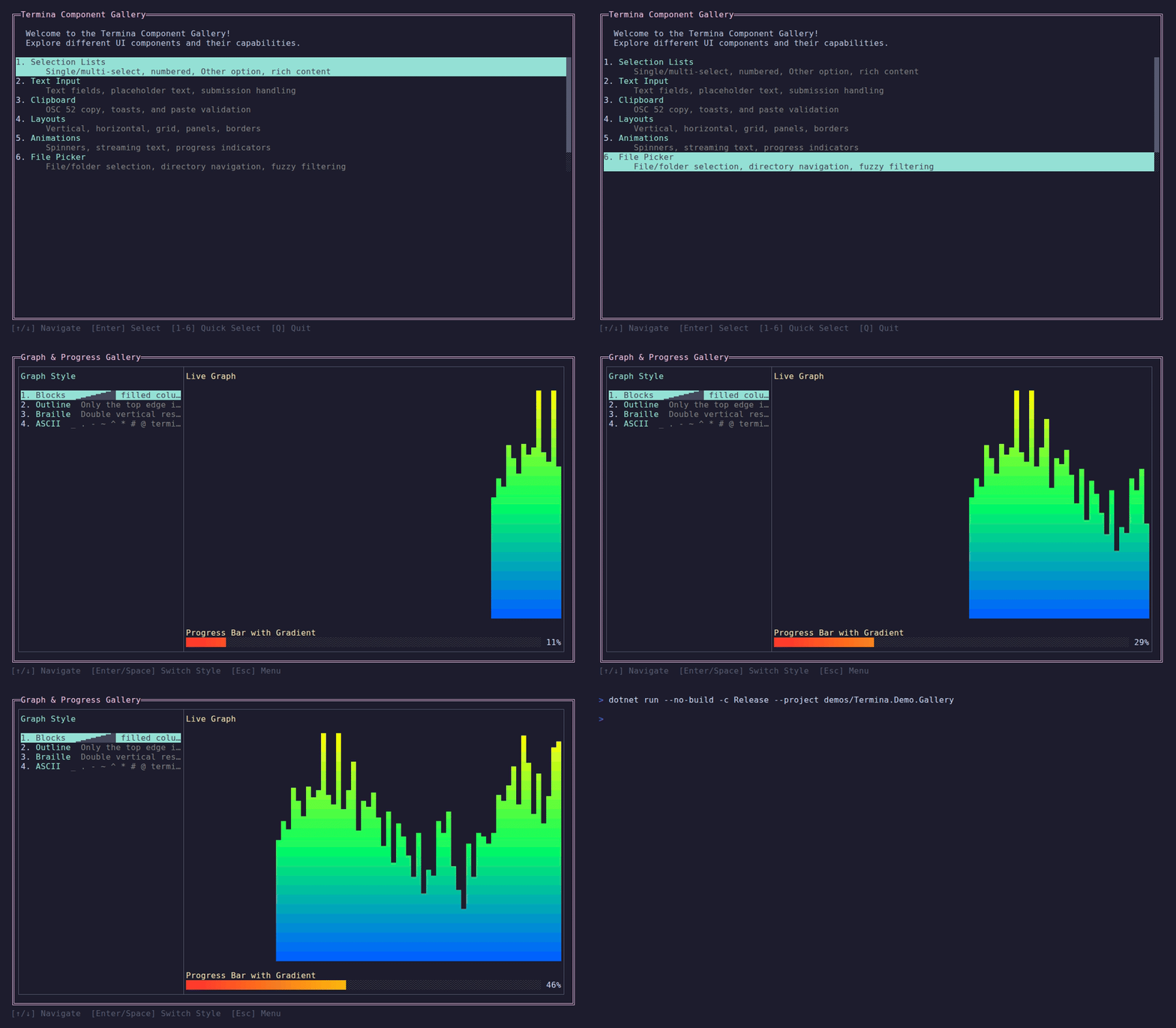
Animated Demo — Gradient progress bar with color cycling
Demo — Animated gradient progress bar
csharp
new ProgressBarNode()
    .WithColor(Color.Green)
.WithValue(0.5)Gradient Fill
Apply a gradient that maps color across the bar width:
csharp
var gradient = Gradient.Create(
    Color.FromRgb(255, 50, 50),   // red at start
    Color.FromRgb(255, 200, 0),   // yellow in the middle
    Color.FromRgb(50, 255, 50));  // green at end

new ProgressBarNode()
    .WithGradient(gradient)
.WithValue(0.75)Labels
Add a formatted label after the bar. The format string receives the normalized value (0–1):
csharp
new ProgressBarNode()
    .WithColor(Color.Cyan)
    .WithValue(0.42)
.WithLabel("{0:P0}") // renders "42%"Custom Characters
Change the fill and empty characters:
csharp
new ProgressBarNode()
    .WithFillChar('━')
    .WithEmptyChar('─')
    .WithEmptyColor(Color.DarkGray)
    .WithColor(Color.BrightGreen)
.WithValue(0.6)Custom Range
By default the value range is 0–1. Override with WithRange:
csharp
new ProgressBarNode()
    .WithRange(0, 200)
    .WithValue(150)       // 75% filled
.WithLabel("{0:P0}") // "75%"Reactive Updates
WithValue fires invalidation, so the bar repaints immediately:
csharp
Observable.Interval(TimeSpan.FromMilliseconds(100), TimeProvider.System)
    .ObserveOn(RenderFrameProvider)
.Subscribe(_ => progressBar.WithValue(GetProgress()));ProgressBarNode itself does not own a timer. If a timer or backend callback drives it, marshal that source through RenderFrameProvider before calling WithValue.
API Reference
Constructor
csharp
public ProgressBarNode()Defaults to Height(1) and WidthFill().
Methods
| Method | Description |
|---|---|
.WithGradient(Gradient) | Apply gradient across filled portion |
.WithColor(Color) | Single-color convenience |
.WithValue(double) | Set current value and trigger repaint |
.WithRange(double min, double max) | Set value range (default 0–1) |
.WithLabel(string format) | Format string for label (receives normalized 0–1) |
.WithFillChar(char) | Filled character (default █) |
.WithEmptyChar(char) | Empty character (default ░) |
.WithEmptyColor(Color) | Color for empty portion (default DarkGray) |
Source Code
View ProgressBarNode implementation
csharp
using R3;
using Termina.Rendering;
using Termina.Terminal;

namespace Termina.Layout;

public sealed class ProgressBarNode : LayoutNode, IInvalidatingNode
{
    private readonly Subject<Unit> _invalidated = new();
    private Gradient? _gradient;
    private double _value;
    private double _minValue;
    private double _maxValue = 1.0;
    private string? _labelFormat;
    private char _fillChar = '█';
    private char _emptyChar = '░';
    private Color _emptyColor = Color.DarkGray;

    public Observable<Unit> Invalidated => _invalidated.AsObservable();

    public ProgressBarNode()
    {
        HeightConstraint = new SizeConstraint.Fixed(1);
        WidthConstraint = new SizeConstraint.Fill();
    }

    public ProgressBarNode WithGradient(Gradient gradient) { _gradient = gradient; return this; }
    public ProgressBarNode WithColor(Color color) { _gradient = Gradient.Create(color, color); return this; }
    public ProgressBarNode WithValue(double value) { _value = value; _invalidated.OnNext(Unit.Default); return this; }
    public ProgressBarNode WithRange(double min, double max) { _minValue = min; _maxValue = max; return this; }
    public ProgressBarNode WithLabel(string format) { _labelFormat = format; return this; }
    public ProgressBarNode WithFillChar(char c) { if (DisplayWidth.GetColumnCount(c) == 1) _fillChar = c; return this; }
    public ProgressBarNode WithEmptyChar(char c) { if (DisplayWidth.GetColumnCount(c) == 1) _emptyChar = c; return this; }
    public ProgressBarNode WithEmptyColor(Color color) { _emptyColor = color; return this; }

    public override Size Measure(Size available)
    {
        var w = WidthConstraint.Compute(available.Width, available.Width, available.Width);
        var h = HeightConstraint.Compute(available.Height, 1, available.Height);
        return new Size(w, h);
    }

    public override void Render(IRenderContext context, Rect bounds)
    {
        if (!bounds.HasArea)
            return;

        var ctx = context.CreateSubContext(bounds);
        var totalWidth = bounds.Width;
        var range = _maxValue - _minValue;
        var normalized = range > 0 ? Math.Clamp((_value - _minValue) / range, 0.0, 1.0) : 0.0;

        string? label = null;
        var barWidth = totalWidth;

        if (_labelFormat is not null)
        {
            label = string.Format(_labelFormat, normalized);
            barWidth = Math.Max(1, totalWidth - DisplayWidth.GetColumnCount(label) - 1);
        }

        var filledCols = (int)Math.Round(normalized * barWidth);

        for (var col = 0; col < barWidth; col++)
        {
            if (col < filledCols)
            {
                if (_gradient is not null)
                {
                    var t = barWidth > 1 ? col / (float)(barWidth - 1) : 0f;
                    ctx.SetForeground(_gradient.Sample(t));
                }
                ctx.WriteAt(col, 0, _fillChar);
            }
            else
            {
                ctx.SetForeground(_emptyColor);
                ctx.WriteAt(col, 0, _emptyChar);
            }
            ctx.ResetColors();
        }

        if (label is not null)
            ctx.WriteAt(barWidth + 1, 0, label);
    }

    public override void Dispose()
    {
        if (!_invalidated.IsDisposed)
        {
            _invalidated.OnCompleted();
            _invalidated.Dispose();
        }
        base.Dispose();
    }
}